

Python client
Verity maintains an open-source Python package, datahub-api-connector, that wraps the API: it
acquires and renews the token, keeps a connection pool, retries what is worth retrying, and turns keyword
arguments into query parameters.
It is a thin layer — as its README puts it, no magic. Requests and responses stay plain HTTP, so everything in Querying the API applies unchanged.
| Package | datahub-api-connector |
| Version documented here | 1.7 |
| Requires | Python 3.10+ |
| Licence | MIT |
Golden rule
This package works only from Insights 7.0 onward.
Version 7.0 (1 July 2025) moved authentication to Keycloak, and the connector speaks only that. For an older platform, the previous opinum-api-connector package is the one to use — it is not maintained any more, so this is a reason to upgrade rather than a supported path.
Install
pip install datahub-api-connector
Configure
Credentials are read from environment variables, not from constructor arguments.
| Variable | Required | Holds |
|---|---|---|
DATAHUB_USERNAME |
Yes | The Insights user the calls act as. |
DATAHUB_PASSWORD |
Yes | Its password. |
DATAHUB_CLIENT_ID |
Yes | The application client id. |
DATAHUB_CLIENT_SECRET |
Yes | The matching secret. |
DATAHUB_SCOPE |
No | Defaults to datahub-api. Use datahub-api push-data to push. |
DATAHUB_API_URL |
No | Another API host than the European SaaS one. |
DATAHUB_AUTH_URL |
No | Another authentication host. |
DATAHUB_PUSH_URL |
No | Another push host. |
See Connect to the API for how to obtain the four credentials, and Scopes for what each scope opens.
Note
Coming from opinum-api-connector? The former names — OPINUM_USERNAME, OPINUM_PASSWORD,
OPINUM_CLIENT_ID, OPINUM_SECRET, OPINUM_SCOPE and the OPINUM_*_URL hosts — are still read when the
DATAHUB_* ones are absent.
Tip
Pass an environment dictionary to the constructor to read the settings from somewhere other than
os.environ — a secret manager, or a test fixture.
A first call
from datahub_api_connector import ApiConnector

with ApiConnector(account_id=1234) as api:
    sources = api.get('sources', DisplayLevel='Light').json()
    print(f"Found {len(sources)} sources")
Every keyword argument becomes a query parameter, with one exception: data is the request body. So
api.get('sources', DisplayLevel='Light', SiteId=42) produces
GET /sources?DisplayLevel=Light&SiteId=42.
Two conversions are applied to the parameters:
- a
datetimevalue is sent asYYYY-MM-DDTHH:MM:SS, without time zone — pass a string to control it; date_fromis sent asfrom, which is a reserved word in Python.
The methods return the raw requests response — call .json() yourself.
| Method | Use |
|---|---|
get, post, patch, put, delete |
The API on api.opinum.com. |
push_data(body, operation_id=None, operation_timeout_sec=None) |
The push service, in the standard format. |
push_dataframe_data(df, **kwargs) |
Same, from a pandas DataFrame with date and value columns. |
send_file_to_storage(filename, file_io, mime_type) |
Upload to storage. Not retried, and does not raise on an HTTP error — check the response. |
close() |
Release the connection pool. The context manager does it for you. |
Lifetime of an instance
An ApiConnector holds a pool of open connections. It is meant to be built once, reused, and closed.
Golden rule
One instance per thread, reused — never one per call, nor one per account.
An instance built for a single unit of work keeps its connections open until Python collects it. A cache of instances that are never closed — one per account, typically — runs the machine out of sockets on a long run, which shows on Windows as WSAENOBUFS or ERR_NO_BUFFER_SPACE. To work through many accounts, keep one instance and change its account_id.
with ApiConnector() as api:
    for account_id in account_ids:
        # the next call uses a token for that account
        api.account_id = account_id
        sources = api.get('sources', DisplayLevel='Light').json()
Accounts
account_id selects the tenant, and it is sent on every token request, renewals included.
api = ApiConnector(account_id=1234)
api.account_id = 5678         # used from the next call on
print(api.token_account_id)   # account the token really claims
Golden rule
If the user has access to several tenants, always set account_id.
Without it the connector uses the last tenant that user touched — which is a property of the past, not of your code. Reading and writing the wrong account is a failure that produces no error at all, only wrong data in a real place.
Pushing data
api.push_data(
    [{"variableId": 7174702,
      "data": [{"date": "2026-08-28T10:00:00", "value": 12.4}]}],
    operation_id="nightly-2026-08-28",
)
The payload is the standard format. Passing your own operation_id is what ties a
webhook callback — or a support ticket — back to the run that produced it.
Important
Pushing requires the push-data scope. Set DATAHUB_SCOPE="datahub-api push-data", or the push is
rejected with a 401 while your reads keep working.
Retries
This is the part worth understanding, because the connector already does what most integrations hand-roll badly.
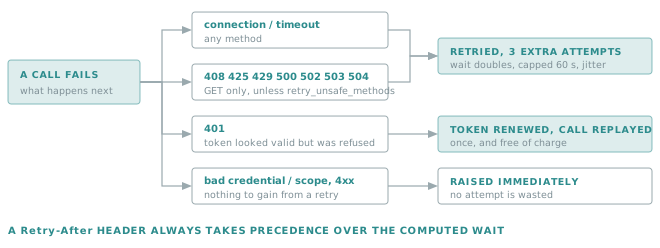
Retries are on by default since 1.6: three extra attempts, with the wait doubling each time
(seconds_between_retries, capped at 60 seconds) plus a jitter so threads sharing an instance stop retrying in
lockstep. A Retry-After header given in seconds replaces the computed wait, within the same 60-second cap.
| Parameter | Default | Role |
|---|---|---|
retries_when_connection_failure |
3 (max 5) |
Extra attempts. 0 restores the pre-1.6 single-attempt behaviour. |
retry_on_status |
7 statuses | Statuses retried rather than raised: 408, 425, 429, 500, 502, 503, 504. None disables. |
retry_unsafe_methods |
False |
Apply those statuses to POST/PUT/PATCH/DELETE too. |
seconds_between_retries |
5 |
The first wait. |
request_timeout |
10 |
Seconds, on every request including the token. |
pool_size |
32 |
Connection pool. Must be ≥ the number of threads sharing the instance. |
Two behaviours are handled apart and cost nothing from the attempt budget:
- A
401on a token that still looked valid — revoked, clock skew, account switched server-side — renews the token and replays the call once. - A rejected credential or scope is raised straight away. So is any other
4xx: a second attempt would fail identically.
Network failures — a timeout, a dropped connection, a truncated response — are retried on every method,
writes and pushes included; retry_unsafe_methods only governs the HTTP statuses. A failure of the
authentication server while the instance is built is retried the same way.
Golden rule
Leave retry_unsafe_methods off unless the write is safe to replay.
A retried write that the server had already applied before failing duplicates the change. Pushing the same data points at the same timestamps overwrites, so it is safe; a POST /sources replayed after a failure can create a second source. The query-by-body POST /data only reads, and is a fair exception. Keep in mind that a write which timed out is replayed whatever this setting.
Parallel calls
multi_thread_request_on_path splits one long parameter list into several calls and runs them in parallel —
the answer to the URL length limit described in
Singular and plural parameters.
from datahub_api_connector import (ApiConnector,
                                   multi_thread_request_on_path)

with ApiConnector(account_id=1234) as api:
    for response in multi_thread_request_on_path(
            api.get, 'data',
            split_parameter='VariableIds',
            max_parameter_entities=80,  # ids per call
            max_futures=8,              # calls in flight
            workers=16,                 # threads, <= pool_size
            VariableIds=variable_ids,
            DisplayLevel='ValueVariableDateSource',
            Granularity='Day', Aggregation='SUM',
            From='2026-08-01T00:00:00Z',
            To='2026-08-31T23:59:59Z',
            IncludeToBoundary='true'):
        rows.extend(response.json())
It is a generator: results arrive as calls complete. When one call of a group fails, the ones that already
succeeded are yielded first and the failure is raised afterwards, so work the API has already done is not
thrown away. Pass raise_on_error=False to collect everything that worked and have the rest logged only.
Tip
response_callback lets you hand back something other than the raw response — lambda r: r.json(), for
instance — so the generator yields the data directly.
Counting without downloading
IncludeItemsCount=True adds an x-total-count response header on the endpoints that support it:
response = api.get('sources', DisplayLevel='Light',
                   IncludeItemsCount=True)
total = response.headers.get('x-total-count', 'unknown')
Reconcile what you asked for
Golden rule
Compare the ids you requested with the ids you received.
A variable with no data in the window is absent from the response rather than returned with a zero. Iterating only over the returned rows makes a silent meter look exactly like a healthy one.
returned = {row["variableId"] for row in rows}
missing = set(variable_ids) - returned
Logging
The package configures only its own logger — log_level="INFO" by default — and leaves the root logger
as your application set it. Retry and failure logs name the method, the URL and the start of the response
body, which is where the API states the actual cause.
Related
- Getting started — the same six steps in
curl. - Querying the API — every parameter used above.
- Recipes — task-oriented examples.
- .NET client — the equivalent for a .NET integration.