

.NET client
Verity maintains a .NET client, Opinum.DataHub.Client, that removes the boilerplate around the API:
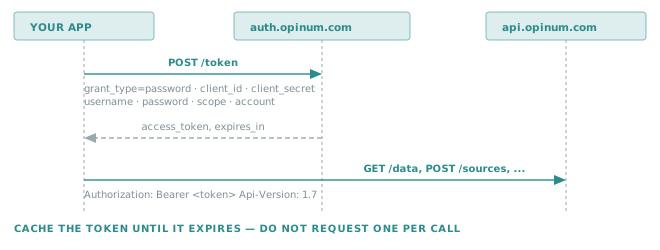
it acquires and renews the token, applies the Api-Version header, resolves relative paths against the right
host, and builds query strings — including the repeated array parameters described in
Querying the API.
It is a thin layer. Requests and responses stay plain HTTP, so everything in Querying the API applies unchanged.
Important
The package is published on Verity's private NuGet feed, not on nuget.org. Ask support@opinum.com for access to the feed. Every concept on this page has a plain-HTTP equivalent, so an integration in any other language loses nothing.
What it handles for you
| Concern | Without the client | With the client |
|---|---|---|
| Token | Call the token endpoint, store expires_in, renew before expiry |
Handled by the authentication mode you register |
Api-Version |
Set the header on every request | Taken from configuration |
| Host | Concatenate the base URL yourself | A relative path resolves against the configured API host |
| Array parameters | Repeat the key once per value | WithParameter("VariableIds", listOfIds) |
| JSON | Serialise, set Content-Type |
WithJsonBody(value) |
Registration
Register the client once, at start-up:
services
    .AddDataHubClient(configuration)
    .WithTechnicalUserAuthentication();
WithTechnicalUserAuthentication is the machine-to-machine mode: the client authenticates with the
client_id / client_secret pair and the service-user credentials, exactly as described in
Connect to the API.
Configuration
The registration reads a DataHub section:
{
  "DataHub": {
    "Api": {
      "HostUrl": "https://api.opinum.com",
      "Version": "1.7"
    },
    "Push": {
      "HostUrl": "https://push.opinum.com"
    },
    "Authority": "https://auth.opinum.com/realms/opinum",
    "Scope": "datahub-api push-data",
    "AccountId": 0,
    "ClientId": "...",
    "ClientSecret": "...",
    "Username": "...",
    "Password": "..."
  }
}
| Key | Notes |
|---|---|
Api.HostUrl |
Base for every relative path passed to the request builder. |
Api.Version |
Sent as the Api-Version header — pin it, see Selecting a version. |
Push.HostUrl |
The ingestion host. Relative paths do not resolve against it — see Pushing data. |
Authority |
The realm base URL; the client appends the OpenID Connect paths. |
Scope |
Space-separated, as in Scopes. Include push-data if you push. |
AccountId |
Selects the account when the user has access to several. |
Golden rule
The four credentials belong in a secret store, never in appsettings.json.
A service user with the Data Pusher right can write into your whole account. Use user-secrets locally, and a key vault or the platform's secret mechanism everywhere else — the file in source control should hold placeholders only.
Making a request
Inject DataHubClient, build a request, send it. The builder is fluent and ends with Build():
public class SourceReader(DataHubClient client)
{
    public async Task<List<Source>> GetSourcesOfSiteAsync(int siteId, CancellationToken ct = default)
    {
        var request = client.CreateApiRequestBuilder(HttpMethod.Get, "sources")
            .WithParameter("DisplayLevel", "Normal")
            .WithParameter("SiteId", siteId)
            .Build();

        var response = await client.SendAsync(request, ct);
        response.EnsureSuccessStatusCode();

        return await response.Content.ReadFromJsonAsync<List<Source>>(ct) ?? [];
    }
}
| Member | Role |
|---|---|
CreateApiRequestBuilder(method, path) |
Starts a request. A relative path resolves against Api.HostUrl; an absolute URL is used as it is. |
.WithParameter(name, value) |
Adds a query parameter. A collection is expanded into the repeated form. |
.WithJsonBody(value) / .WithJsonBody(value, options) |
Serialises the body as JSON. |
.Build() |
Produces the HttpRequestMessage. |
client.SendAsync(request, ct) |
Sends it, with the token and version headers applied. |
Tip
SendAsync returns the raw HttpResponseMessage and does not throw on a non-success status. Call
EnsureSuccessStatusCode(), or inspect StatusCode yourself, before reading the body.
Reading data points
The /data conventions apply directly. Counting points server-side, over a batch of variables:
var request = client.CreateApiRequestBuilder(HttpMethod.Get, "data")
    .WithParameter("DisplayLevel", "ValueVariableDateSource")
    .WithParameter("Granularity", "All")
    .WithParameter("Aggregation", "COUNT")
    .WithParameter("From", from.ToUniversalTime().ToString("yyyy-MM-dd'T'HH:mm:ss'Z'"))
    .WithParameter("To", to.ToUniversalTime().ToString("yyyy-MM-dd'T'HH:mm:ss'Z'"))
    .WithParameter("IncludeToBoundary", "true")
    .WithParameter("VariableIds", variableIds)   // expanded to VariableIds=1&VariableIds=2&...
    .Build();
Important
WithParameter expanding a list does not make the URL any shorter. The length limit described in
Singular and plural parameters still applies: batch
around 80 ids per call, or move the filter into the body with POST /data.
Always format dates with CultureInfo.InvariantCulture, or a machine running under a non-Gregorian culture
will produce dates the API cannot parse.
Writing
POST and PUT take a JSON body. Null properties are usually meant to be omitted rather than sent, which is
what JsonIgnoreCondition.WhenWritingNull does:
var options = new JsonSerializerOptions
{
    DefaultIgnoreCondition = JsonIgnoreCondition.WhenWritingNull
};

var request = client.CreateApiRequestBuilder(HttpMethod.Post, "sites")
    .WithJsonBody(site, options)
    .Build();
Note
The response body differs between resources: creating a site or a variable returns the new id as a bare integer, while creating a source returns the full source object. Deserialise accordingly.
Pushing data
The push service lives on another host, so a relative path would resolve against the API host. Build the
absolute URL from Push.HostUrl:
var pushUrl = $"{configuration["DataHub:Push:HostUrl"]!.TrimEnd('/')}/api/data";

var request = client.CreateApiRequestBuilder(HttpMethod.Post, pushUrl)
    .WithJsonBody(dataPoints)
    .WithParameter("operationId", $"MY-JOB-{Guid.NewGuid()}")
    .Build();
The payload is the standard format. Passing your own operationId is what lets you
tie a webhook callback — or a support ticket — back to the exact run that produced it.
Resilience
The client does not retry. Network timeouts and 5xx responses are worth a bounded retry with a delay;
4xx responses never are, since replaying the same invalid request changes nothing.
services.AddDataHubClient(configuration)
        .WithTechnicalUserAuthentication();
// then wrap your own calls in the retry policy of your choice (Polly, for instance)
Tip
Retry the call, not the token acquisition. A failure to authenticate is a configuration problem, and hammering the token endpoint turns it into a lockout.