

Querying the API
The Swagger definition lists every endpoint and every parameter, but it cannot show how they fit together. This page covers what an integration actually needs: how the resources relate, how filters combine, and how to read data points without pulling more than necessary.
Everything below assumes you already have a token — see Connect to the API.
The entity chain
The whole API is organised around one chain. Understanding it is what turns a list of endpoints into a mental model.
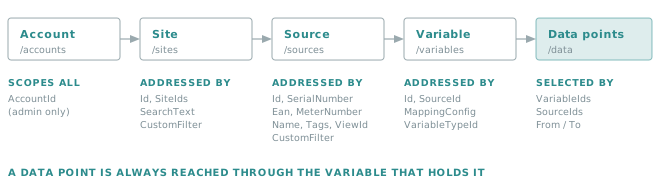
| Level | Endpoint | What it represents |
|---|---|---|
| Account | /accounts |
The tenant. Everything else lives inside one account. |
| Site | /sites |
A physical place — a building, a plant, a delivery point. |
| Source | /sources |
Something that produces data at that site: a meter, a gateway, a file feed. |
| Variable | /variables |
One measured quantity of that source: an index, a power, a temperature. |
| Data points | /data |
The timestamped values held by a variable. |
Two consequences shape every integration:
- A data point is always reached through its variable. There is no endpoint that returns values without
going through
/variablesor/datafilters. To read a meter you first need its variable id — or a filter that identifies it. - The chain must exist before the data does. Sites, sources and variables are created first, through the API or through the interface. Data arriving for a structure that does not exist is discarded.
Business identifiers
Beyond the internal Id, sources and variables carry identifiers you control. They exist precisely so that an
external system can address Insights entities using its own vocabulary, without storing our internal ids.
| Identifier | On | Typical use |
|---|---|---|
SerialNumber |
Source | The manufacturer or asset serial number. |
Ean |
Source | The EAN / delivery-point code. |
MeterNumber |
Source | The meter number used by the operator. |
Name |
Source, Variable | Human-readable name. |
MappingConfig |
Variable | The key used by the push service to pick a variable inside a source. |
Tags |
Source, Variable | Free labels, filterable directly. |
Tip
Populate at least one business identifier when you create a source. An integration that resolves entities by
SerialNumber or Ean survives an environment change; one that hard-codes internal ids does not.
Conventions shared by every endpoint
The collection endpoints — /sites, /sources, /variables, /data — follow the same rules.
Filters combine with AND
Every filter you add narrows the result further. GET /sources?SiteId=42&State=Enabled returns the enabled
sources of site 42, never the union of both conditions.
Singular and plural parameters
Most filters exist in two forms: SourceId for one value, SourceIds for several. The plural form is
repeated in the query string, once per value:
GET /data?VariableIds=101&VariableIds=102&VariableIds=103
Important
A URL has a practical length limit. Past a few dozen ids the request starts failing at the infrastructure level, before it ever reaches the API. Batch the ids — around 80 per call is a safe working figure — or switch to POST /data.
DisplayLevel: how much of each object you get back
DisplayLevel decides how detailed each returned object is. Asking for more than you need is the easiest way
to make a fast endpoint slow.
| Endpoint | Values |
|---|---|
/sites |
SiteLight, Site, VerboseSite |
/sources |
Light, Normal, Verbose, Site |
/variables |
Normal, Verbose |
/data |
Value, ValueVariable, ValueVariableDate, ValueVariableDateSource |
On /data the meaning is different and worth stating plainly: it does not control verbosity, it chooses
which discriminant columns accompany the values. Each level adds one:
| DisplayLevel | Columns next to the values |
|---|---|
Value |
The value fields only. |
ValueVariable |
+ variableId |
ValueVariableDate |
+ variableId, date |
ValueVariableDateSource |
+ variableId, date, sourceId |
Important
Querying several variables with DisplayLevel=Value returns values you cannot attribute to anything: no
variable, no timestamp. Unless you are reading a single aggregate for a single variable, use
ValueVariableDateSource.
Paging
/sites, /sources and /data accept Paging.PageNumber (0-based) and Paging.ItemsPerPage. On /data,
PagingOrder also sets the direction, ASC or DESC.
Selecting by view, by tag or by custom filter
Three parameters go beyond the fixed list of filters, and they are worth knowing before writing a filter of your own.
| Parameter | On | What it does |
|---|---|---|
ViewId |
/sites, /sources |
Reuses a view already defined in the interface. The selection logic stays in Insights, and your code only carries an id. |
Tags |
/sources, /variables |
Matches the free labels set on the entity. The simplest way to mark a subset for an integration. |
CustomFilter |
/sites, /sources |
An expression reaching into fields no dedicated parameter covers, including your own form fields. |
OdmSqlFilter |
/sources |
Selection expressed against the Open Data Model. |
Tip
Prefer ViewId or Tags when they can express the need. Both are visible and editable in the interface,
so the selection can be adjusted without a deployment — a CustomFilter is buried in your source code.
CustomFilter expressions
CustomFilter has a full grammar of its own, documented — with its operators, its type rules and a BNF
definition — in Custom filter query syntax. It is the same syntax as the source search
box in the Insights portal.
Two common forms:
Name like acme
matches on a standard field of the entity, and:
'Informations'.'General'.'SalesForceId' = '0011t00000ABCDE'
walks into a form field, quoting each level of the path — here the field SalesForceId, inside the group
General, of the form Informations.
To build the path of one of your own fields, open the form in the interface and read the levels from the outside in: form, then group, then field.
Beyond equality, the grammar supports <>, >, >=, <, <=, like, startswith, endswith and their
negations, criteria combined with boolean operators, searches on empty properties, and filtering on a foreign
entity. All of it is in Custom filter query syntax.
Tip
Whatever the expression, assert on the result. A CustomFilter that returns zero rows where you expected
one is the failure mode to guard against, and it looks exactly like "no data" to the caller.
Reading data points
GET /data is the endpoint most integrations spend their time in. Every query answers the same four
questions, and it is worth composing them in that order.
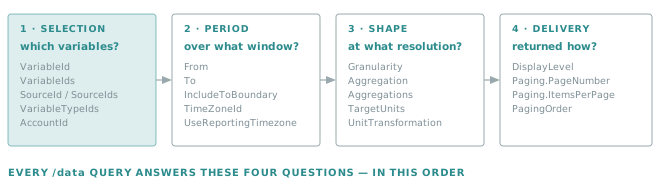
1 — Selection: which variables
| Parameter | Notes |
|---|---|
VariableId / VariableIds |
The most direct selection. |
SourceId / SourceIds |
Every variable of those sources. |
VariableTypeId / VariableTypeIds |
Every variable of a given type, across sources. |
AccountId |
Administrators only. For everyone else the account comes from the token. |
2 — Period: over what window
| Parameter | Notes |
|---|---|
From |
Start of the range, included. |
To |
End of the range — included only if IncludeToBoundary is set. |
IncludeToBoundary |
Off by default. This is the classic off-by-one: without it, midnight of the last day is excluded. |
TimeZoneId |
Interpret and return dates in this time zone (BCL or IANA name). |
UseReportingTimezone |
Interpret and return dates in the time zone of the variable's parent site. |
Golden rule
Decide the time zone explicitly, on every data query.
From and To are read in the zone set by TimeZoneId or UseReportingTimezone. Leave both unset and a daily total silently shifts by the site's UTC offset — a bug that surfaces months later, on a summer/winter boundary. The two parameters are mutually exclusive: set one, never both.
3 — Shape: at what resolution
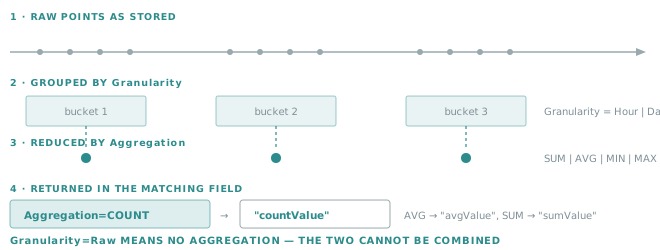
Granularity groups the raw points into buckets; Aggregation reduces each bucket to a single number.
| Parameter | Values |
|---|---|
Granularity |
Raw, Minute, Hour, Day, Week, Month, Year, All |
Aggregation |
None, SUM, MIN, MAX, AVG, COUNT, VAR, STDEV |
Aggregations |
Several at once, in one call. |
TargetUnits, UnitTransformation |
Convert values into the first compatible target unit. |
Important
Granularity=Raw and an aggregation are mutually exclusive — raw means "no aggregation". Granularity=All
collapses the whole window into one row per variable, which is what you want for a total or a count.
4 — Delivery: how the result comes back
The response is a JSON array. Each row carries the discriminant columns chosen by DisplayLevel, plus the
value fields:
| Field | Present when |
|---|---|
rawValue |
No aggregation. |
sumValue, minValue, maxValue, avgValue, countValue, stdevValue, varianceValue |
The matching aggregation was requested. |
unitId |
Always. |
The rule to remember: the aggregation you ask for names the field you read. Aggregation=COUNT puts the
result in countValue, AVG in avgValue.
Note
Variables with no data in the window are simply absent from the response — they do not come back with a zero. Treat "missing" and "zero" as different answers, and reconcile against the ids you requested.
Important
The Swagger definition under-declares this response. The published schema for GET /data lists the
value fields and unitId only: the variableId, date and sourceId columns that DisplayLevel adds are
absent from it, even though the API returns them.
The consequence is for generated clients: a model class generated from swagger.json silently drops
those columns, and the rows become impossible to attribute to a variable or a timestamp. Either extend the
generated model by hand, or deserialise loosely and read the fields you asked for. Inspecting one real
response is the fastest way to see the actual shape.
Only the latest point
A frequent need — "what is the last reading of these meters?" — is a paging trick rather than a dedicated endpoint.
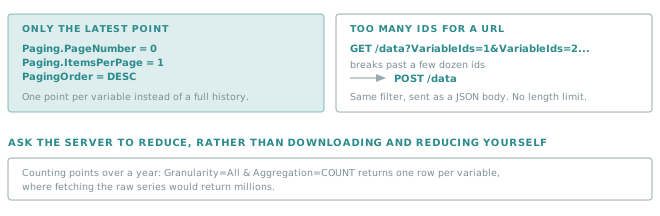
GET /data?VariableIds=101&VariableIds=102
        &DisplayLevel=ValueVariableDateSource
        &Paging.PageNumber=0&Paging.ItemsPerPage=1&PagingOrder=DESC
When the filter is too long for a URL
POST /data performs the same query as GET /data, with the filter in a JSON body instead of the query
string. Same parameters, same response, no length limit.
Use it as soon as the id list grows — it is simpler than batching, and it is the documented way to run wide queries.
Deleting data points
DELETE /data removes points from a range. It takes a WhatIf flag:
| Field | Notes |
|---|---|
VariableIds |
Required. |
FromDateUtc, ToDateUtc |
The range to clear. |
WhatIf |
When true, the response reports what would be deleted, and nothing is removed. |
Golden rule
Run every deletion once with WhatIf = true, and read the result, before running it for real.
A deletion cannot be undone, and a filter that selects one variable too many is indistinguishable from a correct one until after the fact.
Choosing between the API and the push service
Reading is always api.opinum.com. Writing depends on what you are writing.
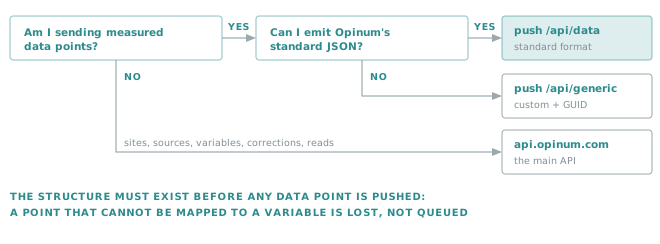
| You are... | Use | Why |
|---|---|---|
| Sending measured data points, in our format | push.opinum.com/api/data |
Built for volume, asynchronous, with webhook feedback. See Standard format. |
| Sending a file in your own format | push.opinum.com/api/generic/{guid} |
Verity maps it for you. See Custom format. |
| Creating or updating sites, sources, variables | api.opinum.com |
The push service never creates structure. |
| Correcting or deleting existing points | api.opinum.com |
DELETE /data, then push the corrected values. |
| Reading anything at all | api.opinum.com |
The push service is write-only and returns no data. |
Note
A push is asynchronous: the HTTP call returns immediately, and parsing, insertion and aggregation happen
afterwards. A 200 means "accepted", not "stored". The webhook described in
Standard format is how you learn the real outcome.
Patterns that scale
Counting a year of points? Granularity=All with Aggregation=COUNT returns one row per variable, instead of millions of rows you would count yourself.
Fetch the variable ids you need at start-up and cache them. Re-resolving them on every cycle multiplies the calls for a mapping that rarely changes.
…that still identifies your rows. Verbose on a thousand sources is a large payload built for one field.
One token, cached until expires_in, for the whole run.
Network timeouts and 5xx deserve a bounded retry with a delay. Retrying a 400 never helps.
On every call, to the version you tested against.
Worked examples
All examples assume TOKEN holds a bearer token.
Find a source by its EAN, then list its variables:
curl -s -H "Authorization: Bearer $TOKEN" -H "Api-Version: 1.7" \
  "https://api.opinum.com/sources?Ean=541448000000000000&DisplayLevel=Normal"

curl -s -H "Authorization: Bearer $TOKEN" -H "Api-Version: 1.7" \
  "https://api.opinum.com/variables?SourceId=12345&DisplayLevel=Verbose"
Read a raw series over a day, in the site's own time zone:
curl -s -H "Authorization: Bearer $TOKEN" -H "Api-Version: 1.7" \
  "https://api.opinum.com/data?VariableId=67890\
&DisplayLevel=ValueVariableDateSource\
&Granularity=Raw\
&From=2026-08-01T00:00:00&To=2026-08-02T00:00:00\
&UseReportingTimezone=true"
Daily consumption over a month:
curl -s -H "Authorization: Bearer $TOKEN" -H "Api-Version: 1.7" \
  "https://api.opinum.com/data?VariableId=67890\
&DisplayLevel=ValueVariableDateSource\
&Granularity=Day&Aggregation=SUM\
&From=2026-08-01T00:00:00Z&To=2026-08-31T23:59:59Z&IncludeToBoundary=true"
Count the points of several variables without downloading them:
curl -s -H "Authorization: Bearer $TOKEN" -H "Api-Version: 1.7" \
  "https://api.opinum.com/data?VariableIds=101&VariableIds=102&VariableIds=103\
&DisplayLevel=ValueVariableDateSource\
&Granularity=All&Aggregation=COUNT\
&From=2026-01-01T00:00:00Z&To=2026-12-31T23:59:59Z&IncludeToBoundary=true"
Each row of the answer carries a variableId and a countValue; a variable absent from the answer has no
data at all in the window.
Key takeaways
- Everything hangs off the Account → Site → Source → Variable → Data point chain, and the structure comes before the data.
- Address entities by business identifiers, not by internal ids you cannot reproduce elsewhere.
- On
/data,DisplayLevelchooses the discriminant columns, not the verbosity. - Set the time zone explicitly, and remember
IncludeToBoundary. - The aggregation you request names the field you read; absent variables mean no data, not zero.
- Let the server aggregate, batch or
POSTlong filters, and always dry-run a deletion withWhatIf.
Tip
Working in .NET? The .NET client applies all of the above for you — token, version header, host resolution and repeated array parameters.