

Files and triggers
Not every integration speaks JSON. A large share of the data reaching Insights arrives as files — a CSV
dropped on an FTP server, an XML posted over HTTP, an export uploaded from a script. Two families of endpoints
cover that road: /storage holds the files, /fileTrigger decides what happens to them.
The file pipeline
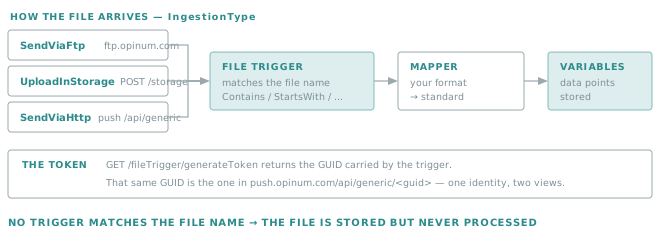
A file is inert until a trigger claims it. The trigger matches on the file name, names the mapper that converts the content, and the mapper produces the data points.
Golden rule
A file whose name matches no trigger is stored and never processed.
Nothing fails, nothing is reported: the file simply sits there. When an integration "sends files but no data appears", the file name against the trigger patterns is the first thing to check — before suspecting the mapper or the structure.
How a file can arrive
The IngestionType of a trigger says which road the file takes.
IngestionType |
The file arrives by | Notes |
|---|---|---|
SendViaFtp |
Dropping it on the Verity FTP server | The classic route for scheduled exports from a third-party system. |
UploadInStorage |
POST /storage |
Fully API-driven; no FTP credentials to manage. |
SendViaHttp |
POST push.opinum.com/api/generic/{token} |
The custom format route. |
Important
These three are the same pipeline with three entrances. Whichever you choose, the trigger, the mapper and the resulting data points are identical — so you can change the transport later without touching the mapping.
Storage
/storage is the file area of your account.
Uploading a file
POST /storage takes the file as multipart form-data, with the name in the query string:
curl -s -X POST \
  -H "Authorization: Bearer $TOKEN" -H "Api-Version: 1.7" \
  "https://api.opinum.com/storage?Filename=readings-2026-08-28.csv" \
  -F "file=@readings-2026-08-28.csv;type=text/plain"
| Parameter | Required | Notes |
|---|---|---|
Filename |
Yes | The name the file is stored under — and the name the triggers match against. |
Tag |
No | Template, Invoice, Dataset, MasterDataTemplate… Classifies the file. |
SiteId |
No | Attaches the file to a site. |
The response is the id of the stored file.
Tip
The multipart field must be named file. Set a Content-Type matching the extension — text/plain for a
.csv or .log, application/json for a .json — rather than letting the client default to
application/octet-stream.
Golden rule
The Filename you send is the integration's contract, not a label.
It is what the triggers match on. Make it deterministic and prefixed — readings-YYYY-MM-DD.csv, not export (3).csv — so a pattern like StartsWith "readings-" keeps working the day the source system changes its own naming.
Listing and retrieving
# List, with the usual paging
curl -s "${AUTH[@]}" "https://api.opinum.com/storage?FileName=readings-&Paging.ItemsPerPage=50"

# One item's metadata
curl -s "${AUTH[@]}" "https://api.opinum.com/storage/12345"

# Download one or more files
curl -s "${AUTH[@]}" "https://api.opinum.com/storage/file?ids=12345"
GET /storage accepts FileName, SearchText, SiteId, SiteTypeId, GroupId, Tags, the usual
Paging.*, and CloudItemTypeId to filter by kind: Image, Word, Excel, Pdf, Text, Archive,
Data.
Deleting
curl -s -X DELETE "${AUTH[@]}" "https://api.opinum.com/storage?ids=12345&ids=12346"
Important
There is no dry-run on this endpoint. Unlike DELETE /data, which
offers WhatIf, a storage deletion happens immediately. List first, check the ids, then delete.
File triggers
A trigger is the rule that binds a file name pattern to a mapper.
Reading the existing triggers
curl -s "${AUTH[@]}" "https://api.opinum.com/fileTrigger?ItemsPerPage=50"
curl -s "${AUTH[@]}" "https://api.opinum.com/fileTrigger/42"
curl -s "${AUTH[@]}" "https://api.opinum.com/fileTrigger/count"
The shape of a trigger
| Field | What it holds |
|---|---|
Id |
The trigger id. |
FileType |
The format of the incoming file. |
IngestionType |
SendViaFtp, UploadInStorage or SendViaHttp. |
TriggerType |
Added — the trigger fires when a matching file appears. |
FileNamePatternMatches |
The list of name conditions, each a { FilterType, Value } pair. |
FileTriggerCombination |
And or Or — how those conditions combine. |
State |
Active, Inactive, Deleted, Updated. |
Token |
The GUID identifying this trigger from the outside. |
Metadata |
Mapper-specific settings. |
CreationDate, CreatedBy, LastEditDate, EditedBy |
Audit trail. |
Matching the file name
Each entry of FileNamePatternMatches uses one of eight filter types:
Contains |
StartsWith |
EndsWith |
Equals |
NotContains |
NotStartsWith |
NotEndsWith |
NotEquals |
FileTriggerCombination decides whether all conditions must hold (And) or any of them (Or).
Tip
A pair like StartsWith "readings-" And EndsWith ".csv" is far more robust than a single
Contains "readings", which would also claim a file named old-readings-backup.zip.
The token, and its other name
GET /fileTrigger/generateToken returns a GUID for a new trigger.
That GUID is the same value as the dedicated GUID used by the custom push route:
POST https://push.opinum.com/api/generic/<token>
In other words, a SendViaHttp trigger and a custom format endpoint are two views of one
object. Creating the trigger is what brings the push URL into existence.
Discovering the valid values
Rather than hard-coding enumerations, read them from the API:
| Endpoint | Returns |
|---|---|
GET /fileTrigger/fileTypes |
The supported file formats. |
GET /fileTrigger/filterTypes |
The eight name-matching operators. |
GET /fileTrigger/ingestionTypes |
The three arrival roads. |
GET /fileTrigger/triggerTypes |
The trigger kinds. |
GET /fileTrigger/triggerCombinations |
And / Or. |
GET /fileTrigger/mappings |
The mappers available to your account. |
Same reasoning as for Reference data: fetch once at start-up, cache, never hard-code.
Creating and updating
POST /fileTrigger creates one, PUT /fileTrigger updates one, and DELETE /fileTrigger?ids=… removes them.
Important
The mapper referenced by a trigger is built by Verity for your file format. Creating a trigger that points at a mapper which does not exist produces a trigger that matches files and then fails to convert them. Ask support@opinum.com for the mapper first, then wire the trigger.
Choosing between files and the push API
| Your situation | Prefer |
|---|---|
| A third-party system already produces periodic exports | Files — do not rewrite its output |
| You control the emitting code and can produce JSON | Standard format push |
| Your format is fixed but not ours, and volume is high | Files with a mapper, over FTP or SendViaHttp |
| You need immediate, per-point feedback | The push API with its webhook |
Note
The file road is asynchronous and batch-oriented: arrival, matching, mapping and insertion are separate
steps. Do not expect a file uploaded a second ago to be readable through GET /data — build your
verification around the file's processing outcome, not around an immediate read.