

Reference data
Payloads are full of numeric identifiers: variableTypeId, unitId, sourceTypeId, energyTypeId,
quantityType. None of them is a free value — each comes from a referential the API exposes as its own
endpoint. This page says which endpoint holds which referential, and how to use them without hard-coding
anything.
Where each identifier comes from
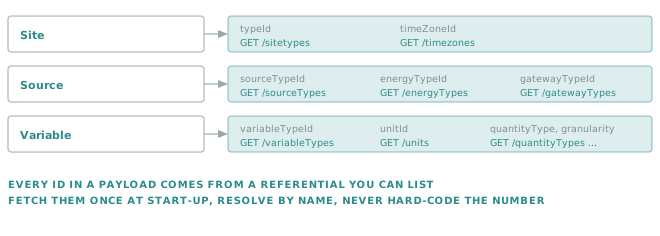
| Endpoint | Referential | Feeds |
|---|---|---|
GET /sitetypes |
Site types | Site.typeId |
GET /sourceTypes |
Source types | Source.sourceTypeId |
GET /energyTypes |
Energy types, each with its usages | Source.energyTypeId |
GET /energyUsages |
Energy usages | Source.energyUsageId |
GET /gatewayTypes |
Gateway types | Source.gatewayTypeId |
GET /variableTypes |
Variable types | Variable.variableTypeId |
GET /units |
Units | Variable.unitId, TargetUnits on /data |
GET /unitFamily |
Unit families | Groups compatible units together |
GET /quantityTypes |
Quantity types | Variable.quantityType |
GET /granularity |
Granularity items | Variable.granularity / granularityTimeBase |
GET /timePeriods |
Time periods | Reports and aggregation windows |
GET /aggregates |
Aggregation functions | Variable.aggregate, Aggregation on /data |
GET /timezones |
Time zones | Site.timeZoneId, Source.timeZoneId |
None of these endpoints takes a parameter. They return the full list.
Golden rule
Fetch the referentials once at start-up, resolve your values by name, and keep the ids in memory.
A literal unitId: 8 buried in your code is unreadable to the next maintainer and unverifiable against another environment. Resolving "Kilowatt-hour" to its id at boot costs one call and turns a silent mismatch into a startup error you can act on.
Reading a referential
Every one of them is a plain GET:
AUTH=(-H "Authorization: Bearer $TOKEN" -H "Api-Version: 1.7")

curl -s "${AUTH[@]}" "https://api.opinum.com/units"
curl -s "${AUTH[@]}" "https://api.opinum.com/variableTypes"
curl -s "${AUTH[@]}" "https://api.opinum.com/sourceTypes"
Most return an array of { "id": …, "name": … }:
[
  { "id": 1, "name": "..." },
  { "id": 2, "name": "..." }
]
Three of them differ:
| Endpoint | Shape |
|---|---|
/units |
{ id, name, symbol, parentId, divisor, offset, unitFamilyId } |
/energyTypes |
{ id, name, energyUsages: [ { id, name } ] } — usages are nested in their type |
/granularity |
{ name, value } pairs |
/quantityTypes, /timePeriods, /aggregates |
A flat { "key": "label" } map rather than an array |
/timezones |
{ id, displayName } |
The referentials come in two sizes, and they deserve different treatment.
| Entries | In this page | |
|---|---|---|
| Small and stable — quantity types, granularity, time periods, aggregates, site types, energy types and usages | 6 to 27 | Listed below. They are platform enumerations and move very rarely. |
| Large and evolving — units (177), variable types (199), source types (114), gateway types (50) | 50 to 199 | Not listed. Read them from the API; a table copied here would be wrong within months. |
Note
The values below were read from the API on 2026-08-28, against API version 1.7. They are stable, but the endpoint remains the authority — if a value here disagrees with a live call, the live call is right.
The small referentials
Quantity types — GET /quantityTypes
The nature of what a variable measures. Drives how Insights aggregates it over time.
| Id | Name | Typical variable |
|---|---|---|
| 1 | Instantaneous | Power, voltage, frequency, flow rate |
| 2 | Integrated | An energy consumption over an interval |
| 3 | Cumulative | A meter index, which only ever grows |
| 4 | Minimum | The lowest value over the interval |
| 5 | Maximum | The highest value over the interval |
| 6 | Averaged | The mean value over the interval |
The full definitions are in Calculated variables.
Aggregates — GET /aggregates
| Id | Name |
|---|---|
| 0 | None |
| 1 | SUM |
| 2 | MIN |
| 3 | MAX |
| 4 | AVG |
| 5 | COUNT |
| 6 | VAR |
| 7 | STDEV |
The names are what GET /data expects in its Aggregation parameter; the ids are what a variable
definition stores in aggregate.
Granularity and time base — two different referentials
This is the trap of this page. Two similar-looking enumerations are used in two different places.
GET /granularity |
GET /timePeriods |
|
|---|---|---|
| Used as | The Granularity parameter of GET /data |
The granularityTimeBase field of a variable |
| Values | Raw 0, Minute 1, Hour 2, Day 3, Month 4, Year 5, All 6, Week 7 |
Second 1, Minute 2, Hour 3, Day 4, Week 5, Month 6, Year 7 |
| Sent as | The name | The id |
Important
The two scales do not line up: 4 means Month in one and Day in the other. Never reuse a value
from one where the other is expected.
On a variable, the spacing between points is expressed as a count and a time base:
{ "granularity": 15, "granularityTimeBase": 2 }   // 15 minutes
{ "granularity": 1,  "granularityTimeBase": 3 }   // 1 hour
{ "granularity": 1,  "granularityTimeBase": 4 }   // 1 day
Site types — GET /sitetypes
| Id | Name | Id | Name |
|---|---|---|---|
| 1 | House | 9 | Hotel |
| 2 | Apartment | 10 | Industry |
| 3 | Office | 11 | Sport hall |
| 4 | Services | 12 | Arts centre |
| 5 | School | 13 | Day Nursery |
| 6 | Hospital | 14 | Village Hall |
| 7 | Restaurant | 15 | Other |
| 8 | Shopping | 16 | Public Lighting |
Energy types — GET /energyTypes
| Id | Name | Id | Name |
|---|---|---|---|
| 0 | Solar | 15 | Noise |
| 1 | Electricity | 16 | Atmospheric Pressure |
| 2 | Gas | 17 | Data |
| 3 | Water | 18 | Cold |
| 4 | Fuel | 19 | Electricity_bis |
| 5 | Heat | 20 | Hot Water |
| 6 | Temperature | 21 | Oil |
| 7 | Carbon dioxide | 22 | Environmental sensor |
| 8 | Humidity | 24 | Steam |
| 9 | Particulate Matter | 25 | Nitrogen |
| 10 | Volatil Compounds | 26 | Compressed air |
| 11 | Pollution | 27 | Services |
| 13 | Waste | 28 | Sewer |
| 14 | Electric Charge |
Each entry nests the energy usages valid for it, so a single GET /energyTypes gives you both levels.
Electricity, for instance, carries Ventilation, Heat, Lighting and Cooling.
Note
Ids 12 and 23 are absent, and a few names carry historical quirks. The list is what it is — read it, do not assume it is contiguous.
Energy usages — GET /energyUsages
| Id | Name | Id | Name |
|---|---|---|---|
| 1 | Ventilation | 10 | Plastic |
| 2 | Heat | 11 | Green |
| 3 | Lighting | 12 | Production |
| 4 | Cooling | 13 | Area lighting |
| 5 | Plumbing | 14 | Barrel |
| 6 | Others | 15 | Fire Protection |
| 7 | General Purpose | 16 | Stormwater |
| 8 | Electricity Main | 17 | Sewer |
| 9 | Paper |
The large referentials
These are too long, too account-dependent and too likely to change to be reproduced here. Read them:
curl -s "${AUTH[@]}" "https://api.opinum.com/units"          # 177 entries
curl -s "${AUTH[@]}" "https://api.opinum.com/variableTypes"  # 199 entries
curl -s "${AUTH[@]}" "https://api.opinum.com/sourceTypes"    # 114 entries
curl -s "${AUTH[@]}" "https://api.opinum.com/gatewayTypes"   #  50 entries
A handful of anchors, useful when reading an existing payload:
| Referential | Id | Name |
|---|---|---|
| Unit | 7 | Watt-hour (Wh) |
| Unit | 8 | Kilowatt-hour (kWh) |
| Unit | 9 | Megawatt-hour (MWh) |
| Unit | 1 | Watt (W) |
| Unit | 4 | Kilowatt (kW) |
| Unit | 18 | Litre (l) |
| Unit | 19 | Cubic meter (m3) |
| Variable type | 0 | General consumption |
| Variable type | 6 | Total consumption |
| Variable type | 130 | Manual Consumption |
| Variable type | 131 | Generic |
Tip
Variable type names contain a few historical typos — Index comsumption Phase C, for example. Match them
exactly as returned, or match on the id.
Units, and why they have a family
The Unit object carries more than a label:
{ "id": 8, "name": "Kilowatt-hour", "symbol": "kWh",
  "parentId": 7, "divisor": 1000.0, "offset": 0.0, "unitFamilyId": 9 }
| Field | Meaning |
|---|---|
id |
The value you put in unitId. |
name |
The full name, for example Kilowatt-hour. |
symbol |
The short form, as displayed — kWh. |
unitFamilyId |
The physical quantity measured: energy, active power, volume, temperature, price… |
parentId |
The reference unit of that family. A reference unit points at itself. |
divisor, offset |
How this unit relates to that reference unit. |
There are 56 families. Energy alone holds 13 units, from millijoules to gigawatt-hours; Price holds 19.
How a conversion works
Every unit of a family is expressed relative to the family's reference unit, and conversion always goes through it.
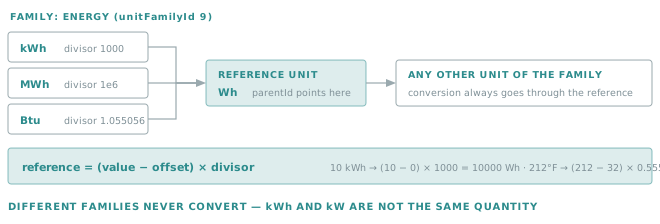
reference_value = (value − offset) × divisor
| Conversion | divisor | offset | Result |
|---|---|---|---|
| 10 kWh → Wh | 1000 | 0 | (10 − 0) × 1000 = 10 000 Wh |
| 1 m³ → l | 1000 | 0 | (1 − 0) × 1000 = 1 000 l |
| 212 °F → °C | 0.55556 | 32 | (212 − 32) × 0.55556 = 100 °C |
| 273 °K → °C | 1 | 273 | (273 − 273) × 1 = 0 °C |
Golden rule
Two units convert into each other only if they share a unitFamilyId.
kWh and kW look related and are not: energy and active power are different quantities, in different families. Asking to convert between them cannot work, and the failure is silent rather than loud — check the family before relying on TargetUnits.
This is exactly what TargetUnits and UnitTransformation rely on when reading data — see
Shape.
Important
A unit is not applied on the way in. When you push a value, it is stored as it is, under the unit declared on the variable. Sending watt-hours into a variable declared in kilowatt-hours produces values a thousand times too large, and nothing warns you — see Getting started.
Time zones
GET /timezones returns { id, displayName }. The id is what goes into Site.timeZoneId and
Source.timeZoneId, and what TimeZoneId accepts on GET /data.
Both BCL names, such as Romance Standard Time, and IANA names, such as Europe/Brussels, are recognised on
the data endpoint. Use whichever your platform produces, and use it consistently.
Important
The time zone of a site is not cosmetic. It is what UseReportingTimezone resolves to, so it determines
where a "day" starts for every daily aggregate built on that site's variables.
Caching them well
Golden rule
Resolve names to ids at start-up, and fail loudly when a name is missing.
If "Kilowatt-hour" no longer resolves, something changed that your integration needs to know about. Falling back to a hard-coded id hides the change; refusing to start surfaces it while someone is still watching.
A workable shape, in any language:
- On start-up, call the referentials your integration actually uses.
- Build a name → id map for each.
- Look up every id you need, and abort with a clear message if one is missing.
- Keep the maps for the lifetime of the process; refresh on restart.
import requests

BASE = "https://api.opinum.com"

def load_referential(session, path, key="name"):
    """Return a {name: id} map for a referential endpoint."""
    rows = session.get(f"{BASE}/{path}").json()
    return {row[key]: row["id"] for row in rows}

units = load_referential(session, "units")
variable_types = load_referential(session, "variableTypes")

try:
    KWH = units["Kilowatt-hour"]
except KeyError:
    raise SystemExit("Unit 'Kilowatt-hour' not found — check the referential before continuing")
Note
Referentials are small and change rarely, so one call each per process start is negligible. Reloading them on every message, on the other hand, is a real cost for no benefit.
Related
- Getting started — where these ids are first needed.
- Querying the API —
TargetUnits,Aggregationand the rest. - Files and triggers — the same approach for trigger enumerations.