

Enedis Energy Community
Enedis, the French distribution system operator, publishes network data as a set of numbered flows. Each flow is a file — XML or JSON — delivered to you as a market player. Insights reads those files, turns every series they contain into data points, and feeds them into variables you have created beforehand.
This page describes what all the flows have in common: how a file is recognised, how a data point finds its variable, and how timestamps are handled. The page of each flow then describes only what is specific to it.
Important
Nothing is created automatically. A file is always read in full, but its data points are stored only where the source and the variable they belong to already exist and already carry the right identifiers. This is why the mapping config key described below is the central object of the whole configuration.
Supported flows
| Flow | Version | What it carries | Format | Restrictions |
|---|---|---|---|---|
| R10/A | 1.3.3 | M-1 load curve of a C2 or C4 point | XML | — |
| R15 | TBA | Readings and indexes of profiled C5 customers | XML | Cancelled readings ignored |
| R151 | TBA | Daily readings and maximum power of C5 Linky points | XML | — |
| R17 | 1.11.2 | Readings and indexes of C2, C3 and C4 customers | XML | Active energy, billing readings only |
| R18/19 | TBA | Extraction load curve for a balance responsible entity | XML | R18 only |
| R4C | TBA | Generic load curve, all measurement types | XML | — |
| R4X | 2.0.2 | Energy and voltage curves for C1–C4 and P1–P3 | XML | R4Q only, daily publication only |
| R50 | TBA | Load curve of a C5 point | XML | — |
| RP12/13 | TBA | Injection load curve per PADT, losses included | XML | RP12 only |
| S505/521 | 1.3.0 | Weekly aggregated curves per supplier and sub-profil | XML | — |
| R63 | 1.3.1 | Load curve history published after an M023 request | JSON | — |
| CR.M023 | 1.2.4 | Completion report of an M023 request | JSON | — |
This table is updated as new flows become available.
How a file is processed
Files are read from your Insights storage. Upload them directly or through FTP; if you receive them by email, Microsoft Power Automate can forward them to the FTP for you.
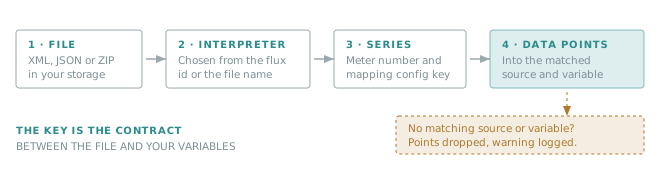
A .zip is opened first, and every entry inside it is processed as if it had been uploaded on its own — which is
how Enedis usually delivers these flows. Files are read decoded: an encrypted or signed envelope has to be
decoded before it reaches the storage.
Steps to use the Enedis Energy Community
- Contact Verity — ask your representative to add the integration to your account.
- Create your sites, sources and variables — see Source configuration and The mapping config key.
- Create an Enedis trigger — the
EnedisEnergyCommunitytrigger type is added to your account by the Verity team. Learn more about triggers. - Upload the files — directly, or through FTP.
How a file is recognised
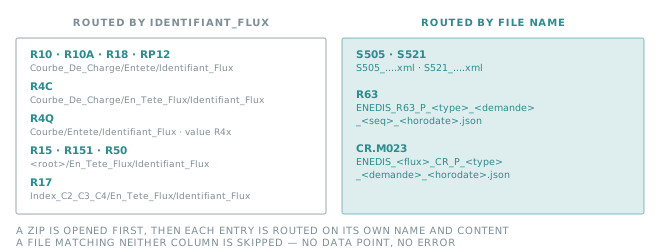
There is one interpreter per flow, and the flow is never guessed from the data. Most flows are recognised from
the Identifiant_Flux element inside the XML; the others are recognised from the file name only.
Warning
For S505, S521, R63 and CR.M023, renaming the file is enough to make it unreadable. Keep the name Enedis published, extension included.
Source configuration
Create one source per point — and for S505 and S521, one source per supplier inside the perimeter.
| Property | Value | What it is used for |
|---|---|---|
| Source type | Pushed Data |
Required. |
| Meter number | Depends on the flow — see below | Required. This is what links a series to a source. |
| Serial number | S505 and S521 only — see below | Required for those two flows, ignored elsewhere. |
| Time zone | UTC |
Data points are always pushed with UTC timestamps. |
| Energy type | Electricity |
Reporting and unit consistency. |
| Name, description | Free text | Readability — a name containing the PRM pays off quickly. |
What to put in Meter number
| Flow | Meter number | Serial number |
|---|---|---|
| R10/A | Identifiant_PRM |
— |
| R15 | Id_PRM |
— |
| R151 | Id_PRM |
— |
| R17 | Id_PRM |
— |
| R18 | Identifiant_PRM |
— |
| R4C | Id_PRM |
— |
| R4Q | Identifiant_PRM |
— |
| R50 | Id_PRM |
— |
| RP12 | Numero_PADT |
— |
| S505 | Area of the series |
Party of the series |
| S521 | Area code read from the file name | Party code read from the file name |
| R63 | idPrm |
— |
| CR.M023 | idPrm of each requested PRM |
— |
Note
When a flow provides a serial number, the source is looked up on meter number and serial number together. Two sources sharing the same meter number are therefore expected for S505 and S521: one per supplier inside the same perimeter.
The mapping config key
For every series it reads, Insights builds a key and looks for a variable of that source carrying exactly that key in its Mapping config property.
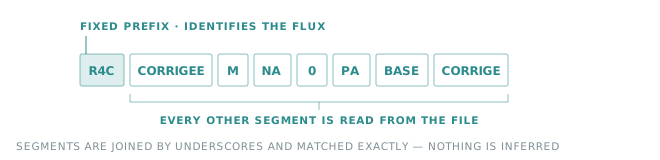
The first segment is the flow name. All the following segments are read from the file — measurement type, time class, point status, granularity — which is why one file usually feeds several variables of the same source. The page of each flow lists its segments and their values.
Warning
The match is exact. A missing segment, an extra segment, a different point status, a lowercase letter instead of an uppercase one, and the variable stays empty — without any error in the file.
Tip
The log gives you the key to create, verbatim: There is no variable with MappingConfig = '…' in source with MeterNumber = '…'. Copying that value into the Mapping config of a new variable is the quickest way to complete a configuration. A missing source is reported the same way: There is no source with MeterNumber = '…'.
Variable configuration
| Property | Value |
|---|---|
| Name | Free text |
| Variable type | Raw |
| Mapping config | The key described on the page of the flow |
| Granularity | Depends on the flow |
| Quantity type | Depends on the flow |
| Unit | Depends on the flow |
Important
The unit published by Enedis is not read from the file. Set the unit of the variable to the one the flow publishes, otherwise the values are stored as they are, under the wrong unit.
Timestamps
Every data point is stored in UTC. Enedis timestamps come in two shapes, and both end up on the same time axis.
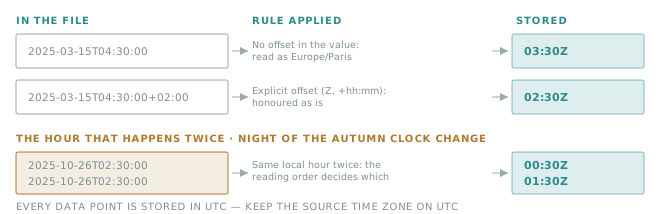
- A timestamp carrying an offset (
Z,+02:00) is honoured as it is. - A timestamp without offset is read as Europe/Paris local time — never as UTC, never as the time zone of the source.
- On the night of the autumn clock change, the same local hour occurs twice. Points are read in chronological order, so the first occurrence gets the summer offset and the second the winter one.
Note
Keep the Time zone of the source on UTC. That setting only changes how values are displayed, but a source
declared in another zone shifts curves that are already correct.
Users rights
To create sites and sources, users need the site and source claims set to ADMIN. Managers can create sites and
sources without any special configuration.
Support
For any question or assistance, contact our technical support through the customer portal: https://help.opinum.com/tickets