

R63
Load curve history published in JSON in answer to an M023 request, submitted through the SGE portal or through
the CommandeHistoriqueDonneesMesuresFines / CommandeHistoriqueDonneesMesuresFacturantes web services.
One file can carry many PRM and can be very large; it is read as a stream, PRM after PRM. The completion of the request itself is reported by a separate file — see CR.M023.
How the file is recognised
R63 files are recognised from their name only, never from their content.
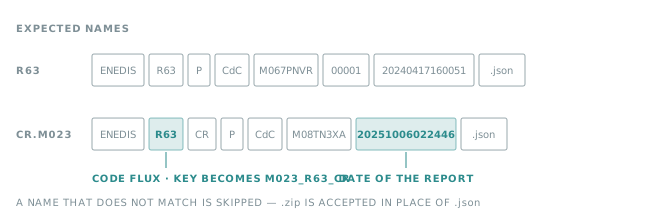
The sequence number is expected on 5 digits and the timestamp on 14. A .zip is accepted in place of the .json.
Warning
A renamed file is skipped: no data point, no error. Keep the name Enedis published.
Insights configuration
| Property | Value |
|---|---|
| Meter number of the source | idPrm of the series |
| Mapping config of the variable | See below |
See Source configuration for the other properties.
Mapping config
R63_{etapeMetier}_{grandeurPhysique}_{n}
| Segment | Value | Meaning |
|---|---|---|
{etapeMetier} |
BRUT |
Raw data, coming directly from the meter |
BEST |
Data including estimated and corrected values — C1–C4 and P1–P3 segments only, active power only | |
{grandeurPhysique} |
PA |
Active power |
PRI |
Inductive reactive power | |
PRC |
Capacitive reactive power | |
E |
Voltage | |
{n} |
B |
Raw |
C |
Corrected | |
R |
Real | |
D |
Imported | |
S |
Mains outage | |
T |
Short mains outage | |
F |
Start of mains outage | |
G |
End of mains outage | |
H |
Reconstructed power | |
E |
Estimated | |
P |
Reconstructed power and mains outage |
The last segment comes from the point, not from the series: a curve mixing raw and estimated points feeds several variables of the same source.
Example
R63_BRUT_PA_B
Data point
Each point carries its own timestamp, its own value and its own status.
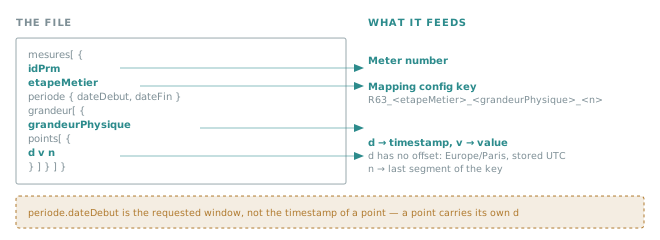
| Timestamp | d of the point. No offset: read as Europe/Paris, stored in UTC — see Timestamps. |
| Value | v of the point |
Important
periode.dateDebut and periode.dateFin describe the window that was requested. They are not the
timestamp of a point, and are not used to place points on the time axis.
Note
The unite published next to a curve is not read. Set the unit of the variable to the one Enedis publishes for
that quantity.
What is not stored
- A point missing any of
d,vorn. - A point whose series is missing
idPrm,etapeMetier,grandeurMetierorgrandeurPhysique—grandeurMetierhas to be present even though it does not appear in the key.