

Master Data introduction
Master Data is the bulk mechanism for creating and updating sites, sources, events* and users — the alternative to calling the API entity by entity. It reads a set of Excel or JSON files and applies them to your account.
The two-file model
A master data upload is always two files, and keeping them straight is most of the learning curve.
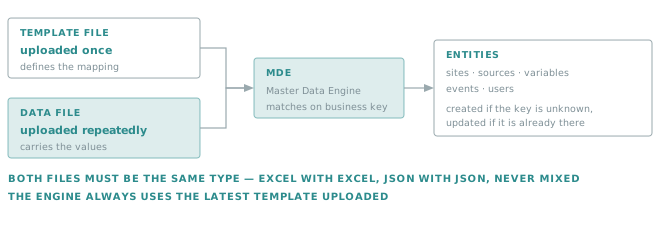
the template file defines the mapping between the data file and the Insights entities. It is uploaded once into the Verity storage, and reused by every later upload.
the data file carries the values themselves, and is uploaded as often as your data changes.
When either file is uploaded into the storage, it is processed by a trigger in a deterministic order.
Important
The engine always uses the latest template uploaded. Uploading a template is therefore not a neutral act: it changes how every subsequent data file is interpreted. See File upload sequence.
A special Whatif mode allows to test/debug the Master Data upload process.
Important
Master Data does not support the mix of Excel/JSON file type for the template and data file, both must be of the same file type
Tip
To ease troubleshooting, it is strongly recommended to include the account name/id in the uploaded file name
Throughout this document, we’ll assume that a customer owns 3 stores, each of them containing some meters whose data must be handled by Verity Insights
Store_Brussels located at Niewstraat 16, 1000 Brussels
- Meter SN0001
- Meter SN0002
Store_Charleroi located at Avenue de Philippeville 24, 6001 Charleroi
- Meter SN0003
Store_Deurne located at Eyendijkstraat 10, 2100 Deurne
- Meter SN0004
* Events are only available when using Json files