

Master Data File Upload Sequence
Two different files reach the storage, and each one is picked up by its own file trigger. The order in which you upload them matters, because the engine always applies the latest template it has received.
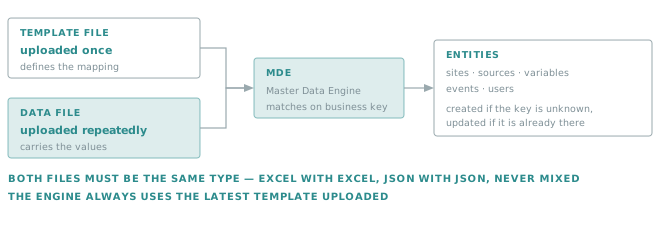
The normal sequence is therefore: upload the template once, then upload data files as often as needed. Upload a new template only when the mapping itself changes — and remember that it takes effect on every subsequent data file, not only on the next one.
Master Data Template

Master Data Upload

Important
Since the Master Data upload process takes the latest Master Data template that was uploaded, it is important to reload a "production" template after uploading one that carries the Whatif operation mode. Failing to do so runs all further uploads in Whatif mode, with no effect on the actual configuration.
This failure is silent and easy to misread: the uploads succeed, the reports look normal, and nothing changes in the account. If a Master Data load "runs but does nothing", check which template is currently in place before looking anywhere else.