

Versioning
What this guide covers. Everything you need to version and tag measurement data in Verity, across all three ways data enters the platform: Standard Files, the Push API, and Calculated Variables. Read the Core Concepts section once — it applies everywhere. Then jump to the ingestion path you use.
Who this is for. Power users, integrators, and anyone writing R for calculated variables who needs output data points to carry a revision marker and/or free-form metadata.
1. Why versioning exists
By default, when new data lands on the same measurement, it overwrites the old value. Versioning changes that: the platform keeps multiple copies of the same measurement over time instead of throwing the previous one away. Each copy is a version.
Use it whenever your data is refined in stages:
- An intraday forecast updated several times a day
- A monthly correction or settlement cycle that supersedes an earlier estimate
- A batch you want to compare against a later batch
Every version is immutable. Once stored, it is never modified — new data always creates a new version alongside the existing ones. Nothing is lost as long as versioning is active.

2. Core concepts (read this once)
| Concept | What it is | Key property |
|---|---|---|
| VersionTimestamp | A timestamp the system generates automatically the moment a version is created. | The only true ordering axis. It records when the system knew or produced this value. "Latest" is always decided by this — never by your label. |
| VersionTag | An optional text label you supply (V1, forecast-run-3, correction-cycle-2). |
Purely informational. No ordering logic. Multiple versions can share the same tag. |
| BusinessTimestamp | The date/time the measurement applies to in your business (the date column). |
Independent of when the version was created. |
| Tags | One or more free-form labels attached to a data point. | The main way to filter and compare versions in dashboards and reports. |
The golden rule
versionis a label, not a number. The platform never sorts or ranks by your tag. Only the system-generated VersionTimestamp determines which version is the most recent.
Two behaviours that surprise people
- VersionTag is auto-copied into
tags. Whatever you put inversionis automatically mirrored into the data point's tags — so you can filter by version in dashboards as alternative option to timestamps, with zero extra config. - Re-pushing the same VersionTag replaces that tag's entry (for the same variable + timestamp).
3. How submission paths compare
You can send versioned data three ways. The concepts above are identical across all of them — only the syntax differs.
| Standard File | Push API | Calculated Variable | |
|---|---|---|---|
| Input | CSV / .xlsx upload |
JSON POST /api/data |
R script output |
| Version field | version column |
version (batch or reading level) |
Version column in returned data frame |
| Tags field | tags column (pipe \| separated) |
tags object (key/value) |
Tags column (JSON-object string per row) |
| Setup needed | IsVersioned flag on the variable |
IsVersioned flag on the variable |
IsVersioned flag on the variable |
| Best for | Manual or scheduled bulk loads | System-to-system integration | Derived values |
4. Path A — Standard File
A Standard File is a CSV or .xlsx you upload; the platform reads it and imports values into the right sources and variables.
File rules
- First line is the header row, then one data row per measurement.
- Column names are case-insensitive; unknown columns are ignored (so exports from other tools work as-is).
- Two columns always required:
date(ISO-8601yyyy-MM-ddTHH:mm:ss) andvalue(numeric, can be negative). - Plus at least one identifier:
variable_id, orsource_*+mapping_config, etc. Mix identifiers freely; rows sharing the same identifier combo are grouped.
Versioning columns (both optional)
| Column | Purpose |
|---|---|
version |
Supplies a VersionTag. Any string is valid — run id, cycle label, batch reference. |
tags |
One or more semantic labels, pipe-separated (e.g. quality:estimated\|period:high). |
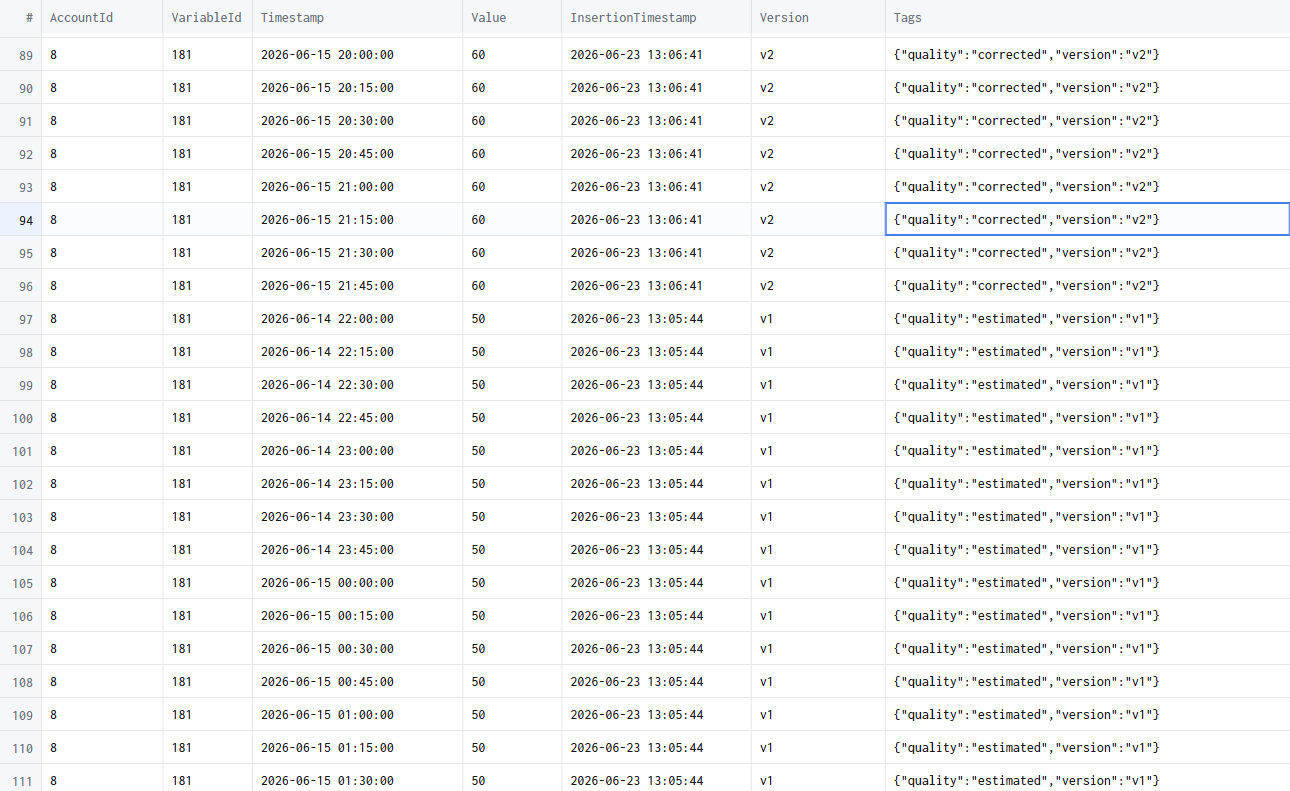
version is a reserved key. No mapping config needed — it's picked up directly at ingestion, version tags are created dynamically the first time they're seen, and the version is available for filtering immediately after ingestion completes.
Example
"date","value","variable_id","version","tags"
"2026-01-01T00:00:00","10","1","V1","quality:estimated|period:high"
"2026-01-01T00:00:00","10","1","V2","quality:consolidated|period:high"
Common mistakes
- Date format is strict —
01/01/2024will not be recognised. Useyyyy-MM-ddTHH:mm:ss. - One header row only — no sub-headers, units rows, or blank rows before data.
- Quoting is optional (
"10"and10both work); column order is free.
5. Path B — Push API
Send data straight from an external system: POST /api/data with a JSON payload. The platform authenticates, validates, and queues for ingestion.
Auth
- Bearer token:
Authorization: Bearer <token> - Or Basic (auto-exchanged for a token):
Authorization: Basic <base64(user:pass)> - Account needs the
datapusher.standardpermission. A401/403means contact your administrator.
Body shape
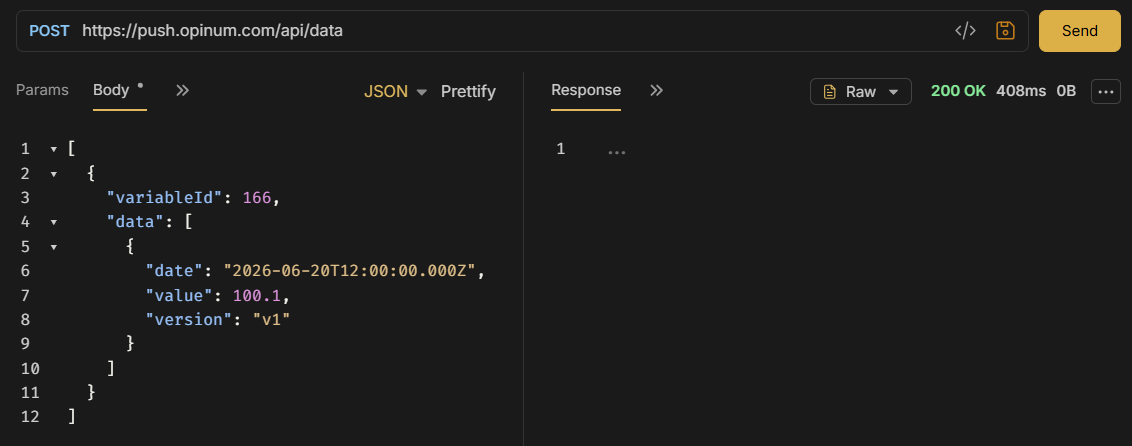
A JSON array. Each element describes one source/variable and carries an array of timestamped data readings. Identifiers work like the Standard File — supply whichever subset uniquely resolves your target (variableId, sourceSerialNumber + variableTypeId, mappingConfig, …).
Version & tags at two levels
- DataModel (batch) level — applies to every reading in that source/variable element. Use when the whole batch shares one version/metadata.
- Individual reading level — overrides or complements the batch values for one data point.
⚠️ Reading-level tags do not replace batch-level tags — the two levels are independent. Design your tagging strategy with that in mind.
The version field behaves exactly as in the Standard File: client-supplied VersionTag, no prior config, created dynamically, auto-copied into tags. Tags here are free-form key/value pairs.
Example — batch level
POST /api/data?operationId=import-2026-05-27&operationTimeoutSec=600

[
  {
    "variableId": 123456,
    "version": "V1",
    "tags": { "site": "plant-a", "import": "nightly" },
    "data": [
      { "date": "2026-05-27T08:00:00Z", "value": 42.5 },
      { "date": "2026-05-27T09:00:00Z", "value": 43.1 }
    ]
  }
]
Example — reading level
[
  {
    "sourceSerialNumber": "MTR-0098",
    "variableTypeId": 7,
    "data": [
      { "date": "2026-05-27T08:00:00Z", "value": 1024.0, "version": "V1", "tags": { "quality": "measured" } },
      { "date": "2026-05-27T09:00:00Z", "value": 1031.5, "version": "V1", "tags": { "quality": "estimated", "reason": "sensor-gap" } }
    ]
  }
]
Keep in mind
- Never include
accountId,userId, orrolein the body — they're read from your token. - Dates should be ISO-8601 with timezone (
2026-05-27T08:00:00Z). Ambiguous local times may be misread. nullfields are ignored — send only what's relevant.
6. What happens when your data is processed
For each measurement (identified by variable + business timestamp):
| Situation | Result |
|---|---|
| VersionTag is new for this variable + timestamp | New version created, tag stored |
| VersionTag already exists for this variable + timestamp | New version created, replacing the previous entry for that tag |
| No VersionTag supplied | New version created; standard purging rules apply |
| Versioning disabled on the variable | Existing data overwritten — no history kept |
Whenever versioning is active, previous versions remain accessible. Versioning must be enabled on the variable for history to be preserved.
Retention & purging
- Default: max 7 versions per datapoint (per variable + timestamp). Configurable per variable or account — ask your administrator.
- At the limit, the shift strategy removes the oldest version to make room. Tagged versions are purged separately from untagged ones.
- Advanced purging profiles (intraday / daily / weekly / monthly retention) are planned for V2.
7. Viewing & comparing versions
Dashboards
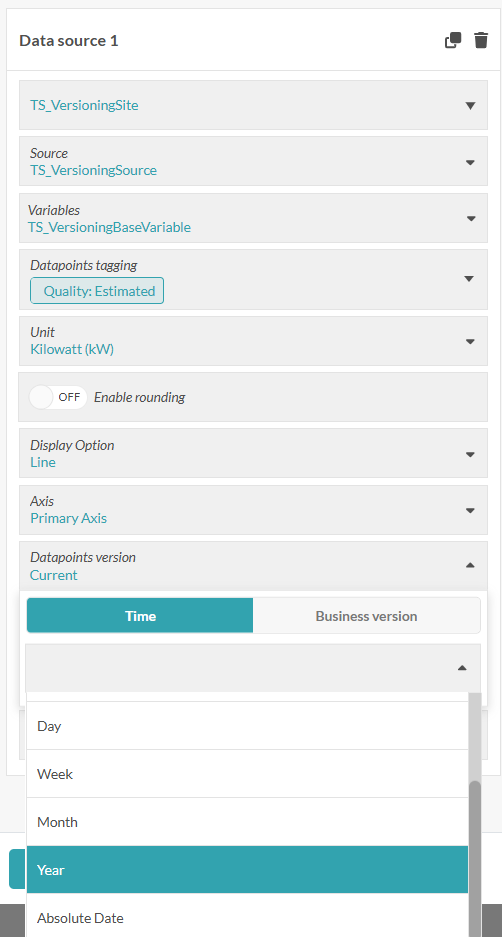
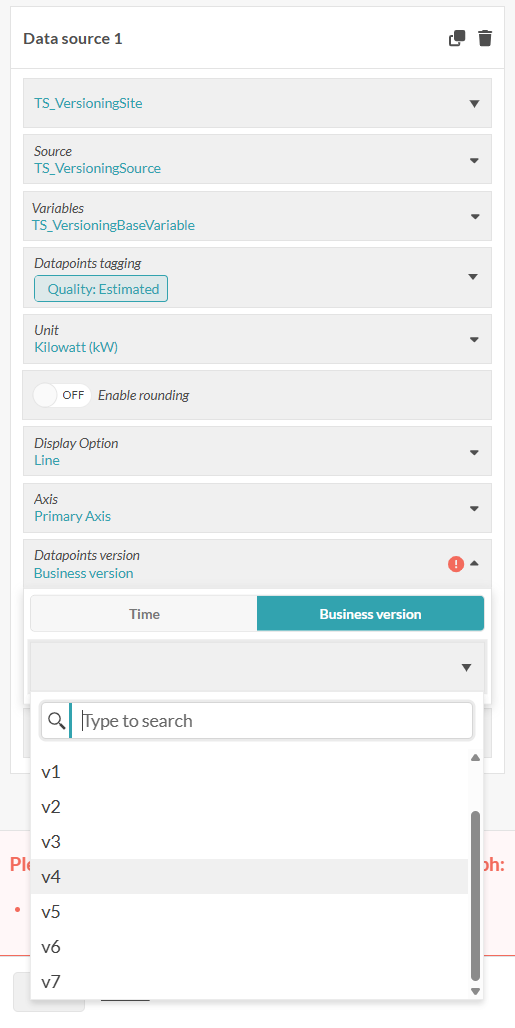
Filter by version in the data-source config. Two modes:
- Relative — picks a version dynamically: Current (latest at time t), or X last hours / days / weeks / months / years.
- Absolute — pick an exact moment with a date/time picker; returns the version that was most recent as of then.
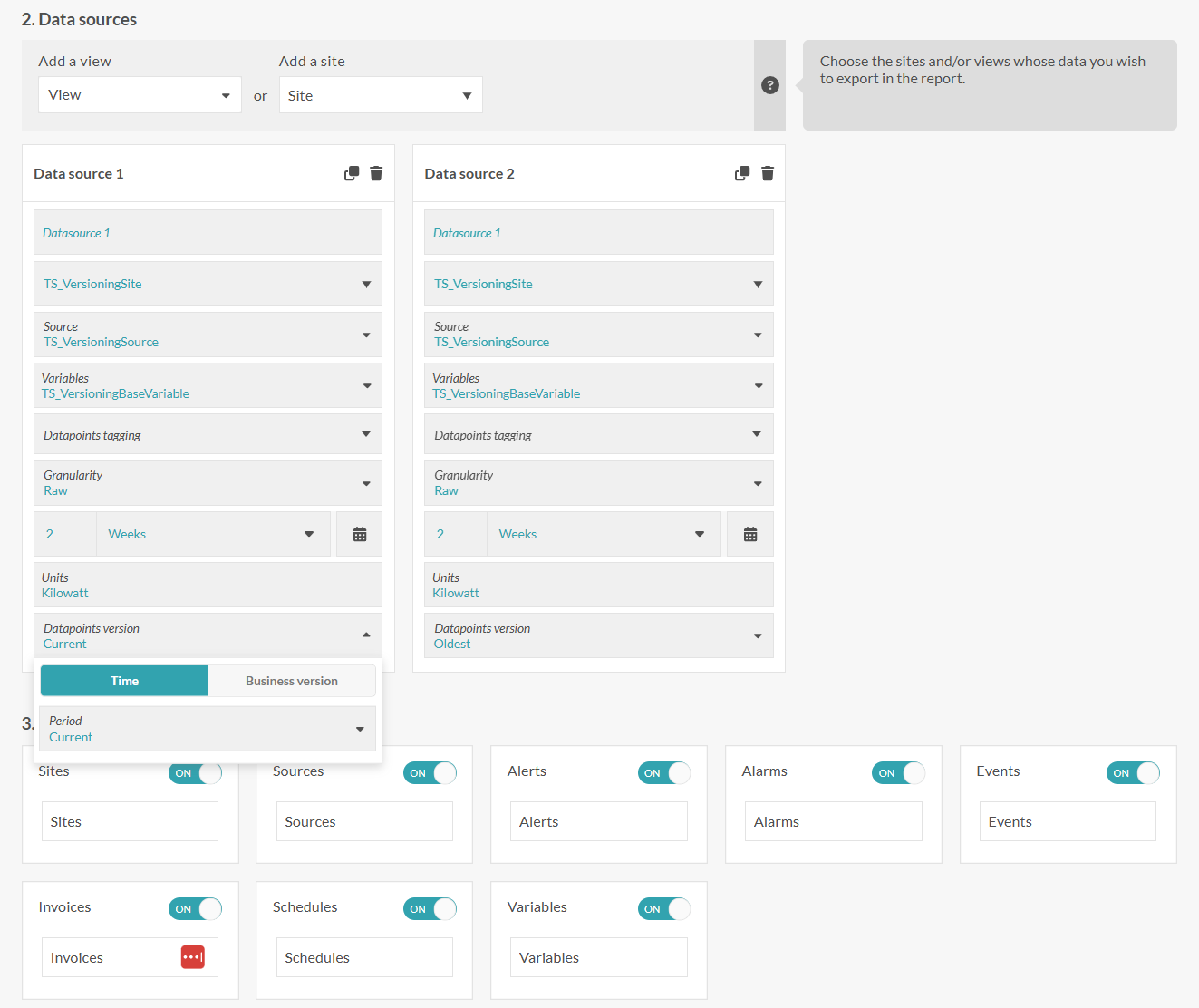
With no filter set, the dashboard always shows the latest available version automatically — no manual refresh. You can display two versions side by side to see how data evolved between runs or correction cycles.
Reports
When configuring a report data source, select a specific version (by tag or by timestamp cutoff) to freeze the report to a precise state of your data.
8. Path C — Calculated Variables (deep dive)
Calculated variables (values derived from other variables) participate in versioning automatically. Each time an input gets a new version, the calculated variable recalculates and produces a new output version. By default the recalculation uses the latest available version of each input.
Every output is at minimum a (Date, Value) pair. This feature lets each data point also carry Version (a revision label) and Tags (free-form JSON metadata). Both fields flow both ways — you can read them on inputs and write them on outputs.
8.1 The one flag that changes everything: IsVersioned
IsVersioned is a setting on the variable, not something the R script controls. It decides how the storage layer treats two writes landing on the same Date:
IsVersioned |
Two writes at the same Date |
|---|---|
| off | Second write overwrites the first. Only one value per timestamp survives. |
| on | Two writes at the same Date with different Version values coexist as distinct revisions. Same Date + same Version still overwrites. |
So
Versiononly does its real job — keeping revisions apart — whenIsVersionedis on. With the flag off,Versionis a passive label.
8.2 The default Version the server fills in
When IsVersioned = true and your script supplies no Version for a row (no column, or ""), the server computes a default and applies it:
- Source: server wall-clock UTC at calculation time (
UtcNow). - Rounding: rounded up to the next whole hour (a time exactly on the hour stays as-is).
- Format: sortable ISO-8601 to the second,
yyyy-MM-ddTHH:mm:ss, no trailingZ. - Scope: one default per calculation run, applied to every row lacking an explicit Version.
| Server time when calculation runs | Default Version stored |
|---|---|
2026-05-19T15:00:00.000 (on the hour) |
2026-05-19T15:00:00 |
2026-05-19T15:00:00.001 |
2026-05-19T16:00:00 |
2026-05-19T15:30:42 |
2026-05-19T16:00:00 |
2026-05-19T15:59:59.999 |
2026-05-19T16:00:00 |
2026-12-31T23:30:00 |
2027-01-01T00:00:00 |
The practical consequence: because the default is rounded to the hour, every recalculation within the same clock hour produces the same default Version — so they overwrite each other. Once the clock ticks into the next hour, a recalculation gets a new Version and is stored as a new revision. Need finer control? Supply your own
Version— your non-empty value always wins.
8.3 Writing the R script
Your script receives each input as an R object:
inputVariables$input1$Variable              # named list of metadata
inputVariables$input1$TimeSeries$Dates      # integer vector, UNIX seconds, UTC
inputVariables$input1$TimeSeries$Values     # numeric vector
inputVariables$input1$Version               # character vector, "" when none
inputVariables$input1$Tags                  # character vector, one JSON object per row, "" when none
TimeSeries has exactly two columns, Dates and Values. Version and Tags sit next to it and carry no dates: element i belongs to row i of TimeSeries. Both are present on every input, versioned or not, and always have nrow(TimeSeries) elements (0 when the input has no points).
To work with all four in one table, recombine them:
ts <- data.frame(inputVariables$input1$TimeSeries,
                 Version = inputVariables$input1$Version,
                 Tags    = inputVariables$input1$Tags,
                 stringsAsFactors = FALSE)
Each input Tags object also holds the reserved key "version". Exclude it when you count or compare tags.
Your script must return the following. On output, Version and Tags are columns of TimeSeries:
list(
  TimeSeries = data.frame(
    Dates   = <integer vector of UNIX seconds, UTC>,  # required
    Values  = <numeric vector>,                        # required
    Version = <character vector>,                      # optional
    Tags    = <character vector>,                      # optional, JSON
    stringsAsFactors = FALSE
  ),
  Errors = c()                                         # optional
)
Rules that matter:
DatesandValuesare mandatory; everything else optional.- If you include
VersionorTags, each must be the same length asDates/Values— a mismatch fails the whole calculation ("must be the same length as Dates/Values"). - A
Versioncell of""means "no version for this row" → server default applies (whenIsVersioned = true). - Each
Tagscell must be""or a valid JSON object with string values, e.g.'{"source":"manual","unit":"kWh"}'. Invalid JSON drops just that row's tags and logs a warning — it does not fail the calculation. - Set
stringsAsFactors = FALSEwhenever you build adata.framewithVersionorTags, otherwisedata.frame()may turn them into factors. - Don't need these fields? Omit the columns entirely.
8.4 Copy-paste recipes
All examples assume one input aliased input1.
Inherit the input's Version and Tags (1:1 transform):
list(
  TimeSeries = data.frame(
    Dates   = inputVariables$input1$TimeSeries$Dates,
    Values  = inputVariables$input1$TimeSeries$Values * 2,
    Version = inputVariables$input1$Version,
    Tags    = inputVariables$input1$Tags,
    stringsAsFactors = FALSE
  )
)
Set your own Version (same label every row):
n <- length(inputVariables$input1$TimeSeries$Dates)
list(
  TimeSeries = data.frame(
    Dates   = inputVariables$input1$TimeSeries$Dates,
    Values  = inputVariables$input1$TimeSeries$Values * 2,
    Version = rep("manual-2026-05-19", n),
    stringsAsFactors = FALSE
  )
)
Mix your own Version with the server default ("" rows fall back to the default):
dates  <- inputVariables$input1$TimeSeries$Dates
values <- inputVariables$input1$TimeSeries$Values * 2
ver    <- ifelse(values > 100, "qa-spike", "")   # "" -> server fills the default
list(
  TimeSeries = data.frame(
    Dates = dates, Values = values, Version = ver,
    stringsAsFactors = FALSE
  )
)
Attach Tags as JSON objects (auto_unbox = TRUE keeps scalars plain):
library(jsonlite)
n <- length(inputVariables$input1$TimeSeries$Dates)
tags <- vapply(seq_len(n), function(i) {
  toJSON(list(source = "qa-test", row = as.character(i)), auto_unbox = TRUE)
}, character(1))
list(
  TimeSeries = data.frame(
    Dates  = inputVariables$input1$TimeSeries$Dates,
    Values = inputVariables$input1$TimeSeries$Values,
    Tags   = tags,
    stringsAsFactors = FALSE
  )
)
# Resulting cells look like {"source":"qa-test","row":"3"}
8.5 Output version assignment summary
| Input VersionTag | Behaviour |
|---|---|
| None (no client tag) | Output version = ingestion hour rounded up. Multiple fires within the hour → same output version, only the last execution survives (earlier ones deduplicated). Different hours → distinct versions. |
V1 (re-pushed) |
Output for V1 is overwritten each time. |
V1 then V2 |
Two separate output versions coexist; each overwritten independently by re-pushing the same tag. |
The mapping of input tag → output version is fully configurable in the calculated variable's R code (inherit a specific input's tag, combine tags from multiple inputs, etc.).
9. Behaviour reference (calculated variables)
IsVersioned |
Script sets Version? | Script sets Tags? | What gets stored |
|---|---|---|---|
| false | no | no | No Version, no Tags. Re-running overwrites in place. |
| true | no | no | Every row gets the default hour-ceiling Version. Re-run within the hour overwrites; after the hour, a new revision. |
| true | yes (per row) | no | Your per-row Version is kept verbatim; server default not applied. |
| true | some rows, "" for others |
no | Non-empty rows keep their Version; "" rows get the server default. |
| true | no | yes | Default Version on every row + the parsed Tags. |
| true | yes | yes | Both fields stored exactly as supplied. |
Default-Version boundary cases: exactly on the hour (15:00:00.000) stays at that hour; 23:59:59.999 UTC rolls into the next day at 00:00:00.
10. Troubleshooting
| Symptom | Cause | Fix |
|---|---|---|
| Calculation fails: "must be the same length as Dates/Values" | Version/Tags vector length ≠ Dates/Values. |
Make every supplied column exactly length(Dates). |
| A row's Tags missing after a successful run | That row's Tags cell wasn't valid JSON; row kept, tags dropped, warning logged. | Emit valid JSON-object strings (jsonlite::toJSON(..., auto_unbox = TRUE)); check server warnings. |
| Recalculations keep overwriting instead of adding revisions | IsVersioned is off, or you're re-running inside the same clock hour (default Version unchanged). |
Turn on IsVersioned; wait for the next hour or supply your own distinct Version. |
| Text values come back as odd factor codes | data.frame() factor conversion. |
Wrap in as.character(...) and set stringsAsFactors = FALSE. |
Verifying a change end to end
- Configure the calculated variable with the
IsVersionedsetting you want. - Trigger a calculation (force-update event or the realtime path).
- Read output DPs back via the DataPoints gRPC service.
- Check
VersionandTagson each row against expectations. - For default-Version cases: cross the hour boundary, retrigger, and confirm a new revision was added rather than the previous one overwritten.
11. Cheat sheet
- Latest = newest VersionTimestamp, never your label.
- Standard File / Push API:
versionneeds no setup, is created dynamically, and is auto-copied intotags. - Calculated variables: revisions only coexist when
IsVersioned = on. - No script Version +
IsVersioned = on→ default = next-hour-ceiling timestamp → one revision per hour. - Your non-empty Version always wins over the server default.
- Default retention = 7 versions per datapoint (configurable).