

Tagging
What this guide covers. Everything you need to label ("tag") your measurement data in Verity, across all three ways data enters the platform: Standard Files, the Push API, and Calculated Variables. Read the Core concepts section once — it applies everywhere. Then jump to the ingestion path you use.
Who this is for. Power users, integrators, account administrators, and anyone writing R for calculated variables whose data points need to carry free-form metadata.
1. Why tagging exists
A tag is a label attached to a data point to give it context: where the value comes from, what state it is in, which period it belongs to. Once applied, tags let you filter, visualize and compare your data consistently across the whole Data Hub.
A tag always follows a strict key:value structure — for example validation:estimated, validation:raw, tariff:off_peak, version:V1.
Use it whenever you want to distinguish subsets of your data:
- Estimated values vs actual measurements
- Off-peak vs peak hours
- Source A vs source B
- Validated vs raw data
A tag is a semantic label. It does not define a timeframe, an aggregation rule, or a calendar — it qualifies the data, nothing more.
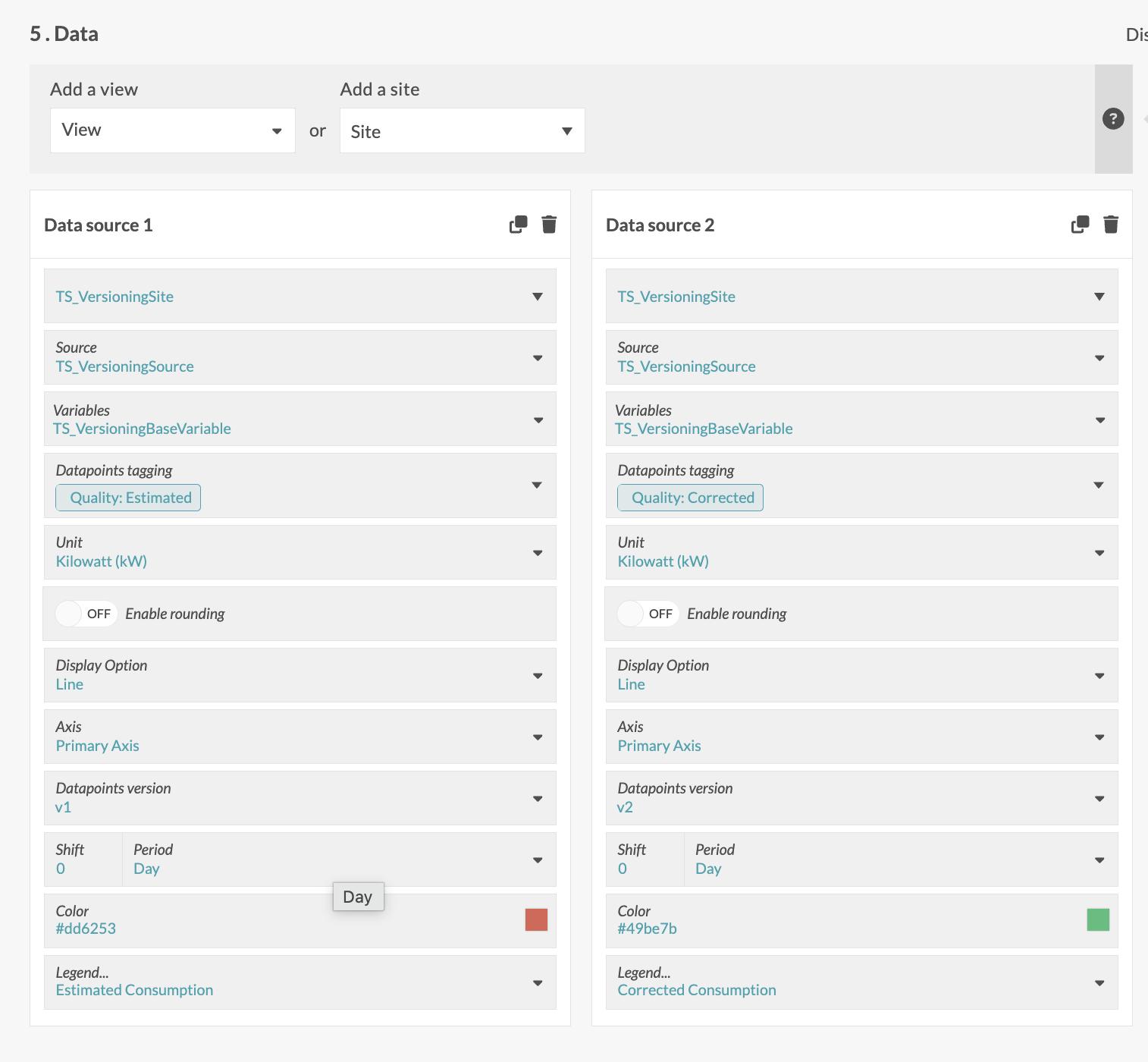
2. Core concepts (read this once)
| Concept | What it is | Key property |
|---|---|---|
| Tag | A key:value pair attached to a data point. |
The key is the category, the value the state. Multiple tags per data point. |
| Tag family | A key + the set of values allowed under that key. | Governed per account via the Tag Manager. |
| Identifier | The normalized, lowercase form (key / value). |
What data is ingested and matched on. Immutable. |
| Display label | The original casing (displayKey / displayValue). |
Cosmetic, editable. Never changes the identifier. |
version family |
Reserved, system-managed family. | Auto-created from ingested version ids. Read-only. |
The golden rule
Only the account's predefined and active tags are recognized at ingestion. A tag not registered in the Tag Manager (a typo, an unknown key) is silently dropped — the data point is still stored, just without that tag.
One behaviour that surprises people
- Case-insensitive.
Productionandproductionare the same value; the identifier is stored lowercase, and the first-seen casing becomes the display label.
3. How submission paths compare
You can send tagged data three ways. The concepts above are identical across all of them — only the syntax differs.
| Standard File | Push API | Calculated Variable | |
|---|---|---|---|
| Input | CSV upload | JSON POST /api/data |
R script output |
| Tags field | tags column (pipe \| separated) |
tags object (key/value) |
Tags column (JSON string per row) |
| Setup needed | None | None | None for tags |
| Best for | Manual or scheduled bulk loads | System-to-system integration | Derived values |
4. Managing tags: the Tag Manager
Before they are recognized at ingestion, tags must be predefined at account level. That is the role of the Tag Manager, reached via Account settings → Tagging → Tag manager. Writes are restricted to the Manager or Admin roles; everyone else has read access.
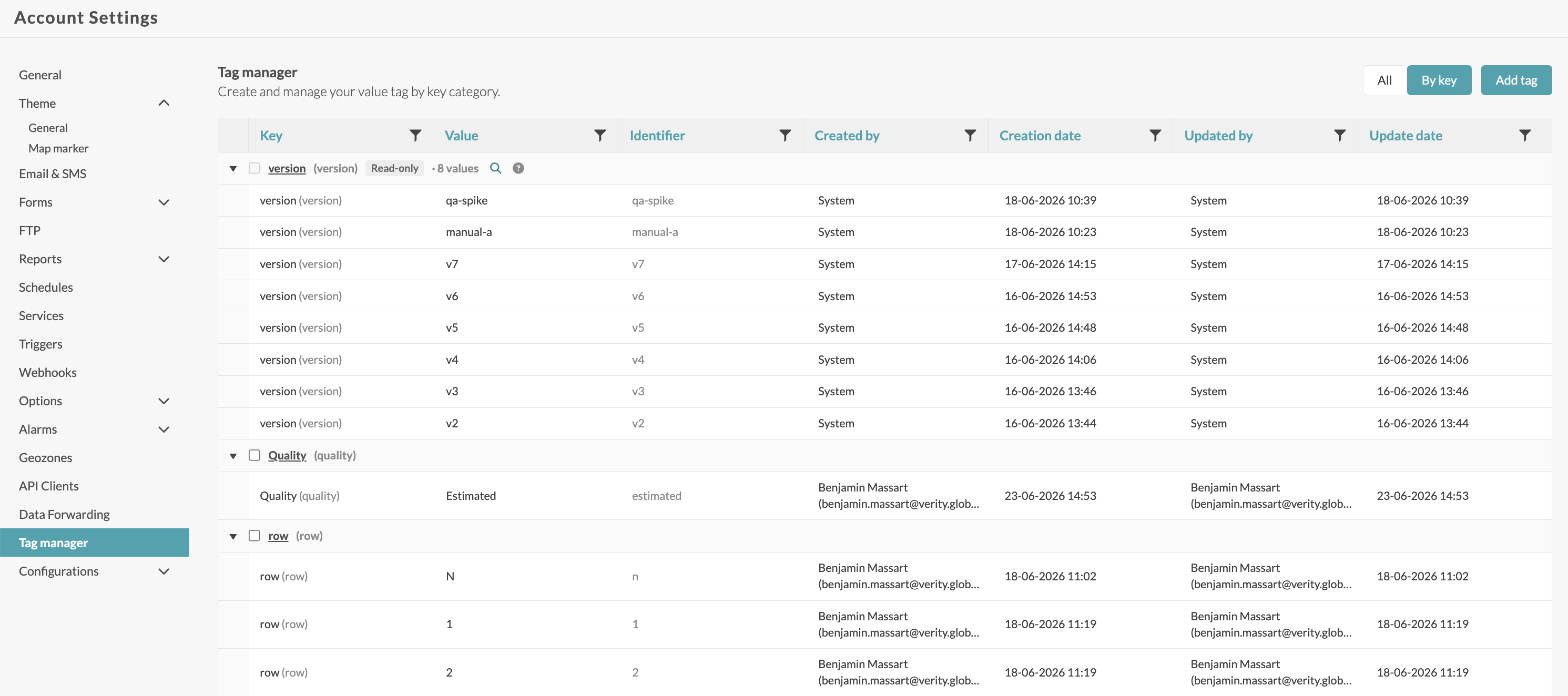
What you can do
| Action | Effect |
|---|---|
| Create a key | New family, unique key + at least one initial value (in the UI). |
| Add / remove a value | On an existing key. |
| Rename a label | Of the key or a value — cosmetic, the identifier does not change. |
| Deactivate / reactivate | Hide or re-show the family from filters (reversible). |
| Delete | Permanent. No impact on data points already stored. |
Rules to know
- Character set:
A–Z a–z 0–9 _ . -only — no spaces. - Lengths: key ≤ 64 characters, value ≤ 256; neither may be empty.
- Cap: max 20 values per key. The
versionfamily is exempt (unbounded).
⚠️ Renaming a label never reroutes data. Ingesting with the label (≠ identifier) would silently drop the tag. The UI always shows both to avoid confusion.
5. Path A — Standard File
A Standard File is a CSV you upload; the platform reads it and imports the values into the right sources and variables.
The tags column (optional)
- One or more
key:valuetags, pipe-separated with|. - Column name is case-insensitive; unknown columns are ignored.
- The
versioncolumn is a reserved key, picked up directly at ingestion.
Example
"date","value","variable_id","version","tags"
"2026-01-01T00:00:00","10","1","V1","quality:estimated|period:high"
"2026-01-01T00:00:00","10","1","V2","quality:consolidated|period:high"
Common mistakes
- A tag must follow the
key:valueform; multiple tags are separated by|, not by a comma. - One header row only — no sub-headers or units row.
- A tag value not registered in the Tag Manager is dropped (see section 8).
6. Path B — Push API
Send data straight from an external system: POST /api/data with a JSON payload. Tags are declared as a key/value object, at two levels.
| Level | Scope |
|---|---|
| Batch (DataModel) | Applies to every reading in that source/variable element. |
| Individual reading | Complements or refines the tags for one specific data point. |
⚠️ Reading-level tags do not replace batch-level tags — the two levels are independent. Design your tagging strategy with that in mind.
Example — batch level
[
  {
    "variableId": 123456,
    "version": "V1",
    "tags": { "site": "plant-a", "import": "nightly" },
    "data": [
      { "date": "2026-05-27T08:00:00Z", "value": 42.5 }
    ]
  }
]
Example — reading level
{
  "sourceSerialNumber": "MTR-0098",
  "variableTypeId": 7,
  "data": [
    { "date": "2026-05-27T08:00:00Z", "value": 1024.0, "tags": { "quality": "measured" } },
    { "date": "2026-05-27T09:00:00Z", "value": 1031.5, "tags": { "quality": "estimated", "reason": "sensor-gap" } }
  ]
}
Never include
accountId,userIdorrolein the body — they are read from your token.
7. Path C — Calculated Variables
A calculated variable can write tags onto its output data points through a Tags column in the data frame returned by the R script.
- Each
Tagscell is either""or a valid JSON object with string values, e.g.{"source":"manual","unit":"kWh"}. - If present, the
Tagscolumn must be the same length asDates/Values(otherwise the whole calculation fails). - Invalid JSON drops only that row's tags (a warning is logged) — the calculation does not fail.
library(jsonlite)
n <- length(inputVariables$input1$TimeSeries$Dates)
tags <- vapply(seq_len(n), function(i) {
  toJSON(list(source = "qa-test", row = as.character(i)), auto_unbox = TRUE)
}, character(1))
# resulting cells: {"source":"qa-test","row":"3"}
Wrap text columns in
as.character(...)and setstringsAsFactors = FALSEto avoid factor conversion. The full R contract is documented in the Versioning guide.
8. What happens at ingestion
Ingestion is a hot path: it must stay fast and must never be blocked by tag bookkeeping.
| Situation | Result |
|---|---|
| Valid tags | Validated against the account config, then stored on the data point as a key:value collection. Multiple tags are kept and independently queryable. |
| No tags | Ingestion proceeds without blocking. No default tag is applied. |
| Unknown tag | Data point is ingested without the unknown tag (never blocked); the unknown tag is reported in the ingestion webhook response. |
| Tag service unavailable | All tags are dropped rather than blocking; the data point is stored untagged. |
The
versionfamily is registered asynchronously: a brand-new version becomes queryable a moment later (a few seconds). This has no impact on the data point, which is never blocked.
9. Filtering logic
When you combine several tags, two rules apply — identical everywhere in the platform.
| Combination | Logic | Example |
|---|---|---|
| Between keys | AND | validation:estimated AND tariff:off_peak |
| Between values (same key) | OR | tariff:off_peak OR tariff:mid_peak |
In short: keys stack up (AND), while values within one key widen the match (OR).
10. Filtering by tag across the platform
Dashboards
On a tile, filter a data source by tag (one or more values, one or more keys). Typical case: validation:validated in blue, validation:estimated in red.
Source / Visualize tab
Filter the displayed data points to inspect a specific version or quality subset. With no filter, the default behaviour is unchanged (latest version per timestamp).
Calculated Variables (input)
Restrict an input data source to data points carrying specific tags. The filter applies both to triggering (recalculate only if the data point matches) and to data fetch (only matching data points enter the computation).
Alarms
Optionally restrict an alarm's evaluation to data points carrying specific tags — avoids false alerts on unvalidated data.
Reports
Optionally apply a tag filter; the report's tag column then reflects the tags of the included data points.
11. API impacts
GetData — filter by tag
- A tag filter returns only matching data points (OR between values, AND between keys).
- With no filter, behaviour is unchanged (latest version per timestamp by default).
- An unknown key/value in the filter returns an explicit error, not a silently empty result.
REST data/tags — manage families
Powers the Tag Manager screen. Send header Api-Version: 1.7. The account is implicit (never send an accountId). Reads are open to any authenticated user; writes are restricted to Manager/Admin.
| Method & path | Purpose |
|---|---|
GET /data/tags |
List families (version excluded by default) |
GET /data/tags/status/active |
Active families (filter pickers) |
GET /data/tags/{key} |
One family with its values |
GET /data/tags/{key}/values |
Paged value search (never 404s) |
POST /data/tags |
Create a family |
PUT /data/tags/{key} |
Rename the label |
DELETE /data/tags/{key} |
Permanent delete |
POST …/deactivate · /reactivate |
Reversible (de)activation |
POST /data/tags/{key}/values |
Add a value |
DELETE …/values/{value} |
Remove a value |
PUT …/values/{value} |
Rename a value's label |
Error model
| Code | When |
|---|---|
400 |
Invalid charset/length, duplicate key/value, 20-value cap reached, or a write on the reserved version family. |
403 |
Write attempted by a non Manager/Admin. |
404 |
Key or value not found (except the value-search endpoint). |
401 |
Not authenticated. |
Ingestion webhook
When a batch contains unknown tags, the webhook response lists the unknown keys/values encountered. The data points are ingested without the unknown tag: no data is lost.
12. Troubleshooting
| Symptom | Cause | Fix |
|---|---|---|
| A tag doesn't appear after ingestion | Tag not registered in the Tag Manager → silently dropped. | Declare the key/value in the Tag Manager, then re-ingest. |
| Version filter is empty | Version just created (asynchronous registration). | Wait a few seconds, then refresh. |
| GetData returns an error on the filter | Unknown key or value in the filter. | Check the spelling of the identifier (≠ display label). |
| A row's tags missing (calculated variable) | Invalid JSON in the Tags cell. |
Emit valid JSON via jsonlite::toJSON(..., auto_unbox = TRUE). |
| Write refused (403) | Insufficient role. | Ask your administrator for a Manager/Admin role. |
13. Cheat sheet
- A tag = key:value. Multiple tags per data point.
- Only predefined and active tags are recognized; unknown ones are dropped and reported to the webhook.
- Standard File:
tagscolumn, pipe-separated with|. - Push API:
tagskey/value object; batch and reading levels are independent. - Calculated Variable:
TagsJSON column, same length asDates/Values. - Filtering: AND between keys, OR between values — everywhere the same.
versionis a reserved, system-managed family, read-only.- Renaming a label never moves data (the identifier is immutable).