

Alarms: period comparison
This type of alarm allows to compare aggregated value of the variable's data points over 2 periods, apply a comparison operator between the aggregated values and set/reset the alarm according to comparison result.
The aggregated periods are:
- the reference period, which will be the left operand of the compare operator
- the compare period, which will be the right operand of the compare operator
A typical use of such an alarm is to check if the average consumption of a period is greater than the average consumption of a previous comparable period.
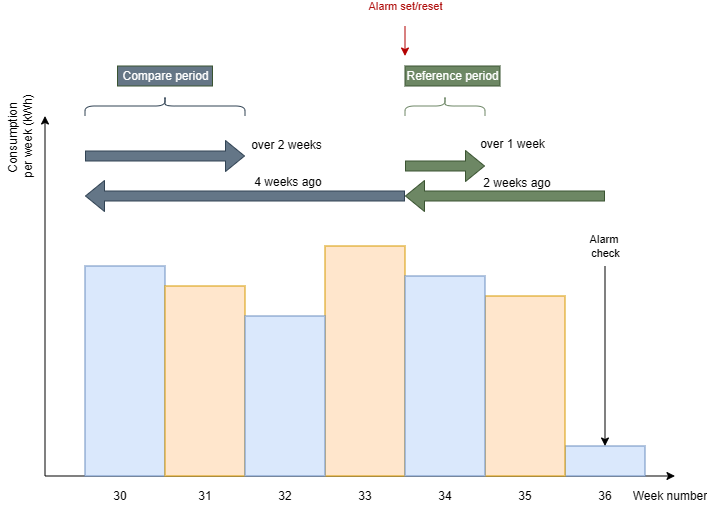
This picture depicts the configuration of an alarm that is triggered in the middle of a week with a state resulting from the comparison of the aggregated value of 1 week starting 2 weeks ago with the aggregation of 2 weeks starting 4 weeks before the reference period (2 weeks ago). The alarm will be set (state = present) if the difference between the reference period and the comparison is, let's say, below a specified value
Properties
Both reference and comparison periods share the same model:
- A negative date seeker telling how far to go to the past (aggregation start date)
- A positive date seeker that determines the period to cover starting from the aggregation start date (aggregation start date)
- An aggregation function telling how to aggregate data between the aggregation start and end dates.
Aggregation start date
This is the first date of the aggregation period, which is computed depending on the kind of period:
- reference period: the date of the first past n entire periods starting from the alarm check date, with n >= 0. In the above example, from the alarm check date (the nearest next occurrence), go 2 entire weeks in the past and select the first day of the week.
- comparison period: the date of the first past m entire periods starting from the reference period start date, with m > 0. In the above example, from the reference start date, go 4 entire weeks in the past and select the first day of the week.
Aggregation end date
This is the end date of the aggregation period, which is computed as the date (23:59:59:9999) of the last n entire periods starting from the aggregation start date, with n > 0 or n == -2 (see below).
In the above example, the reference aggregation end date is calculated by adding 1 entire week in the future to the reference aggregation start date and subtracting 00:00:00.0001. Similarly, the aggregation compare end date is calculated by adding 2 entire weeks in the future to the compare aggregation start date and subtracting 00:00:00.0001. When n == -2, the reference aggregation end date will be the current UTC time and the compare aggregation end date will be (compare aggregation start date + (now - reference aggregation start date)).
Image that you want to compare the average consumption from 2025-01-01 until today (lets say 2025-03-04) with the consumption done 1 year ago during the same period:
- Reference and comparison period type: Year
- Reference and comparison aggregation function: Average
- Reference period: 'Begin of the current year'
- Comparison period: '1 year at the same date'
Using this configuration, the various dates will be
- reference aggregation start date: 2025-01-01
- reference aggregation end date: 2025-03-03
- comparison aggregation start date: 2024-01-01
- comparison aggregation end date: 2024-03-03
Reference period
You can choose the reference period among the following options:
- Day : the aggregation can be done on
- previous day (now-1)
- the whole previous week (now-7 to now-1)
- specific day of the week (e.g., Monday).
- Week : the aggregation can be done on
- previous week (Monday to Sunday of last week)
- specific week of the year (e.g., week 10).
- Month : the aggregation can be done on
- previous month (starting on the 1st day of last month)
- specific month of the year (e.g., March).
- Year : the aggregation can be done on
- previous year (starting on January 1st of last year)
- beginning of the year (starting on January 1st of the current year).
Comparison period
You can choose the comparison period relative to the reference period among the following options:
Note: weeks in Insights always start on Monday.
Day : the aggregation can be done on
- previous day (relative to the reference period)
- 7 days ago (relative to the reference period)
- specific day of the week (e.g., Monday)
- every day last week → see previous week below
Week : the aggregation can be done on
- previous week (relative to the reference period, starting on Monday)
- specific week of the year: e.g., week 10
- 4 weeks ago (relative to the reference period)
- same week last year (relative to the reference period)
Month : the aggregation can be done on
- previous month (starting on the 1st day of the month before the reference period)
- specific month of the year (e.g., March)
Year : the aggregation can be done on
- previous year (starting on January 1st last year, relative to the reference period)
- 1 year at the same date (starting on same date as to but last year, relative to the reference period)
Note: more options are available with the API.
Delta
formula:
Delta = Reference Period Aggregation - Compare Period Aggregation
Remark: The form doesn’t support negative deltas. You can use the comparison operators to check for greater than or less than conditions.

Delta types
Absolute
The absolute delta type calculates the difference by subtracting the comparison period value from the reference period value. For example, if the comparison period had a total consumption of 80 units and the reference period had a total consumption of 100 units, the absolute delta would be 20 units.
Percentage
The percentage delta type calculates the difference as a percentage of the comparison period's total. Using the same example, the percentage delta would be 25% (i.e., (100 - 80) / 80 * 100%).
API
Remark: Enumerations: Both label and values can be used in the API requests and responses.
Keep that in mind when getting or posting alarm objects created by other clients.
POST alarm
The section TimePeriodComparisonDefinition has been added to the alarm object for configuring period comparison alarms.
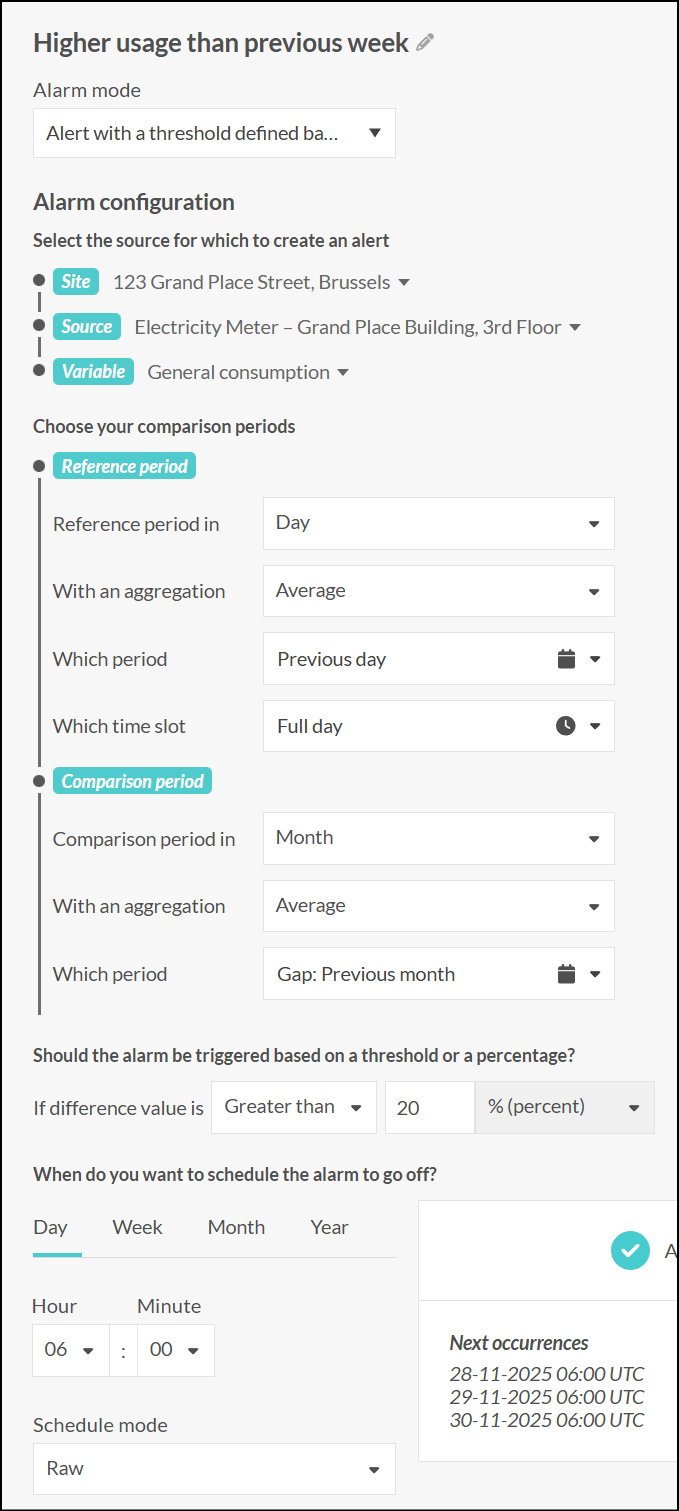
- Request corresponding to the above example:
{
  "siteId": 276550,
  "sourceId": 857281,
  "variableId": 11735411,
  "friendlyName": "Higher usage than previous week",
  "type": "PastPeriodCompare",
  "frequencyType": "Scheduled",
  "cron": "0 6 * * *",
  "timePeriodComparisonDefinition": {
    "referencePeriod": {
      "aggregationPeriodStart": {
				"periodType": "Day",
        "numberOfPeriods": 1
      },
      "aggregationPeriod": {
				"periodType": "Day",
				"numberOfPeriods": 1
      },
			"aggregation": "Average"
    },
    "comparePeriod": {
      "aggregationPeriodStart": {
				"periodType": "Month",
        "numberOfPeriods": 1
      },
      "aggregationPeriod": {
				"periodType": "Month",
				"numberOfPeriods": 1
      },
			"aggregation": "Average"
    },
		"deltaType": "Percentage",
		"comparisonOperator": "GreaterThan",
    "allowedDelta": "20"
  }
}
- Another example of reference period − every Monday from 8am to 6pm:
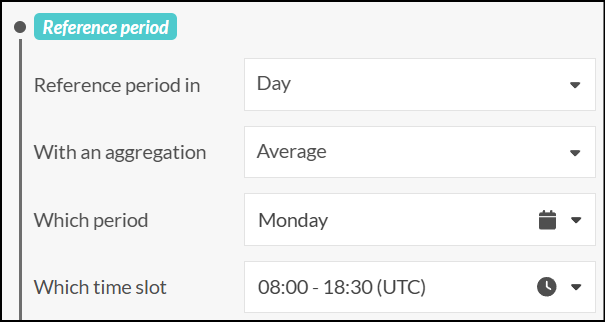
"referencePeriod": {
  "aggregation": "Average",
  "aggregationPeriodStart": {
    "periodType": "Monday",
    "numberOfPeriods": 1
  },
  "aggregationPeriod": {
    "timeBoxedPeriod": {
      "fromTimeStampIso8601": "PT8H",
      "toTimeStampIso8601": "PT18H30M"
    },
    "periodType": "Day",
    "numberOfPeriods": 1
  }
}
POST alarm/getDatesAndAggregationPeriods
This API allows getting the computed start and end dates of both aggregation periods, given an alarm configuration and an alarm check date.
Sample request body:
- now: 2025-11-27T12:07:11.199Z
- reference period: previous day (-1 day from now, November 26, 2025)
- compare period: previous month (-1 month from reference start date, October 2025, starting first day of month)
{
  "alarmTriggerDate": "2025-11-27T12:07:11.199Z",
  "timePeriodComparisonDefinition": {
    "referencePeriod": {
			"aggregation": "Average",
      "aggregationPeriodStart": {
        "numberOfPeriods": 1,
				"periodType": "Day"
      },
      "aggregationPeriod": {
        "numberOfPeriods": 1,
				"periodType": "Day"
      }
    },
    "comparePeriod": {
      "aggregation": "Average",
      "aggregationPeriodStart": {
        "numberOfPeriods": 1,
				"periodType": "Month"
      },
      "aggregationPeriod": {
        "numberOfPeriods": 1,
				"periodType": "Month"
      }
    }
  }
}
Sample response body:
- now: 2025-11-27T12:07:11.199Z
- reference period: previous day (-1 day from now, November 26, 2025)
- compare period: previous month (-1 month from reference start date, October 2025, starting first day of month)
{
  "alarmTriggerDate": "2025-11-27T12:07:11.199Z",
  "referencePeriodStart": "2025-11-26T00:00:00Z",
  "comparePeriodStart": "2025-10-01T00:00:00Z",
  "referencePeriods": [
    {
      "begin": "2025-11-26T00:00:00Z",
      "end": "2025-11-26T23:59:59.9999999Z"
    }
  ],
  "comparePeriods": [
    {
      "begin": "2025-10-01T00:00:00Z",
      "end": "2025-10-31T23:59:59.9999999Z"
    }
  ]
}
More period options with the API
With the API, more options are available for selecting the reference and comparison periods.
You can specify a precise number of periods for both the aggregation start and aggregation periods.
Example: reference period of 1 day starting 3 days ago from the alarm check date and comparison period of 7 days starting 14 days ago from the reference period start date.
{
  "alarmTriggerDate": "2025-11-28T00:00:00.000Z",
  "timePeriodComparisonDefinition": {
    "referencePeriod": {
      "aggregation": "Average",
      "aggregationPeriodStart": {
        "numberOfPeriods": 3,
        "periodType": "Day"
      },
      "aggregationPeriod": {
        "numberOfPeriods": 1,
        "periodType": "Day"
      }
    },
    "comparePeriod": {
      "aggregation": "Average",
      "aggregationPeriodStart": {
        "numberOfPeriods": 14,
        "periodType": "Day"
      },
      "aggregationPeriod": {
        "numberOfPeriods": 7,
        "periodType": "Day"
      }
    }
  }
}
Response of getDatesAndAggregationPeriods API:
{
  "alarmTriggerDate": "2025-11-28T00:00:00Z",
  "referencePeriodStart": "2025-11-25T00:00:00Z",
  "comparePeriodStart": "2025-11-11T00:00:00Z",
  "referencePeriods": [
    {
      "begin": "2025-11-25T00:00:00Z",
      "end": "2025-11-25T23:59:59.9999999Z"
    }
  ],
  "comparePeriods": [
    {
      "begin": "2025-11-11T00:00:00Z",
      "end": "2025-11-17T23:59:59.9999999Z"
    }
  ]
}
Enumerations
Remark: Both label and value can be used in the API requests and responses.
Keep that in mind when getting or posting alarm objects created by other clients.
Alarm type enum
{
  "Threshold": "Threshold",
  "ThresholdWithAggregation": "ThresholdWithAggregation",
  "PastPeriodCompare": "PastPeriodCompare",
}
Frequency type enum
{
  "Raw": "Raw",
  "Rolling": "Rolling",
  "Scheduled": "Scheduled",
}
Aggregation enum
{
  "Average": 0,
  "Minimum": 2,
  "Maximum": 3,
  "Sum": 4,
  "Count": 5
}
PeriodType enum
{
  "Day": 1,
  "Monday": 2,
  "Tuesday": 4,
  "Wednesday": 8,
  "Thursday": 16,
  "Friday": 32,
  "Saturday": 64,
  "Sunday": 128,
  "Week": 256,
  "Month": 512,
  "Quarter": 1024,
  "Year": 2048,
  "WeekNumber": 4096,
  "MonthNumber": 8192,
  "QuarterNumber": 16384
}
ComparisonOperator enum
{
  "LowerThan": 0,
  "LowerThanOrEqual": 1,
  "GreaterThan": 2,
  "GreaterThanOrEqual": 3,
  "Equal": 4,
  "NotEqual": 5,
}
DeltaType enum
{
  "Absolute": 0,
  "Percentage": 1
}