

Verity Insights 7.4
Release date: 27 - 05 - 2025
7.4 introduces new platform capabilities focused on time-series flexibility, tenant autonomy. It strengthens the Source configuration model with time-sliced attributes, improves dashboard generation reliability. These enhancements reinforce our commitment to delivering accurate, flexible, and scalable data management for all clients.
Time-sliced attributes
This release introduces the Time Sliced Property Type, a new temporal behavior for Source Form properties. A Time Sliced property can store multiple values over time, each associated with an effective date, instead of a single static value. This enhancement is fully backward-compatible: all existing properties retain their current Single Value behavior and no data migration is required.
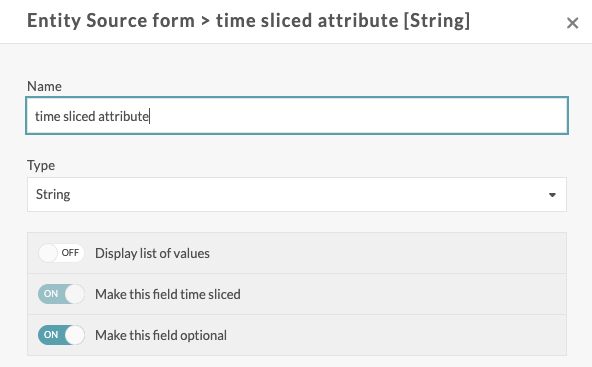
When configuring a property in a Source Form, a new Temporal Behavior switch is available: "Make this field time-sliced" When the attribute is created, it is no longer possible to change this selection.
Note: This option is available for all property types (e.g., String). It is set once at the property definition level.
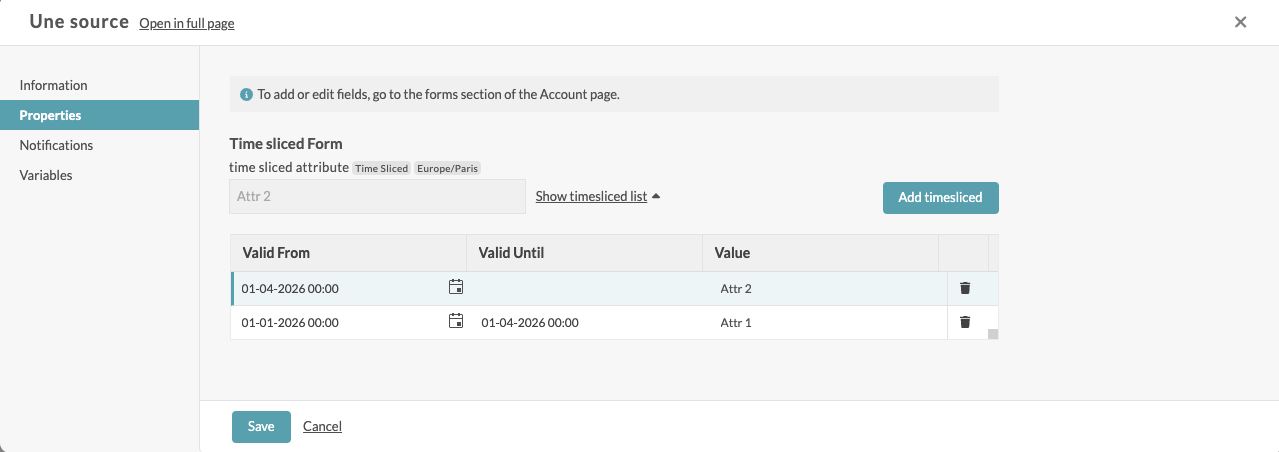
From the source property tab, it will then be possible to define the different slices of the attribute.
R code
Each aliased field is serialized as a data frame–like structure with parallel vectors: EffectiveDates, EndDates, and Values (all index‑aligned). R formulas can access them via:
inputFormsTimeSliced$<alias>$EffectiveDates
inputFormsTimeSliced$<alias>$EndDates
inputFormsTimeSliced$<alias>$Values
Backward compatible
No action required for existing properties or integrations
API imapacts
Form creation
Field Groups.Fields.TimeSliced added (default false)
Example
{
  "id": "69b2bab34c05d25ece27f2cf",
  "name": "Time sliced attribute",
  "type": 0,
  "accountId": 1051,
  "displayOrder": 1,
  "entityType": 2,
  "groups": [
    {
      "id": 1,
      "name": "test",
      "displayHeader": false,
      "displayOrder": 0,
      "fields": [
        {
          "name": "A time-sliced attribute",
          "displayOrder": 0,
          "isList": false,
          "required": false,
          "timeSliced": true,
          "type": 0
        }
      ]
    }
  ]
}
Get sources
When calling the web services get sources and get sources/{sourceId}, it is now possible to add the boolean parameter includeTimeSlicedValues to the request.
If set to false, only the slice valid at the time of the request is returned. For example:
"clientData": {
  "Time sliced Form": {
    "Time sliced group": {
      "time sliced attribute": "Attr 2"
    }
  }
}
If set to true, all slices are returned. For example:
"clientData": {
  "Time sliced Form": {
    "Time sliced group": {
      "time sliced attribute": [
        {
          "EffectiveDate": "2025-12-31T23:00:00Z",
          "Value": "Attr 1",
          "EndDate": "2026-03-31T22:00:00Z"
        },
        {
          "EffectiveDate": "2026-03-31T22:00:00Z",
          "Value": "Attr 2",
          "EndDate": "9999-12-31T23:59:59.9999999"
        }
      ]
    }
  }
}
Add slice
Adds a single slice to a time sliced attribute of a source.
New web service :
POST /sources/{sourceId}/attributes/{formName}/{groupName}/{fieldName}/slices
Example
{
  "FromDate": "2026-05-01T08:00:00.000Z",
  "Value": "May"
}
SaaS Data Ingestion & Processing Engine - Rollout Complete
Following our previous announcement within 7.3 of the Major Evolution of our SaaS Data Ingestion & Processing Engine, we are pleased to confirm that all SaaS customers are now running on the new ingestion engine. The rollout has been completed with full stability and no service interruption noted.
Client ID Management
Clients can now autonomously manage their Client IDs directly from account settings, reducing dependency on platform administrators for identity configuration.
See documentation
Dashboard Generator
Architectural simplification of the Dashboard Generator
Tenant Organization Association
As a DataHub administrator, you can now associate a tenant with an organization when creating or updating a tenant via the API or UI. This ensures that every tenant is linked to an organization for improved governance and management consistency.
Dashboard Axis Scale Enhancement
Added a new dashboard chart configuration option: “Start scale at zero”. When enabled, chart axes automatically start at 0, and the chart updates accordingly. When not enabled, the existing default axis scaling behavior remains unchanged, meaning the scale may not necessarily start at 0.
Infrastructure & Performance
- Kafka topic consumption stabilized for operation notifier
- CV Processor stability fixes based on Prod EU observations
- ARM node support on AKS (PRODUK)
- Unified Swagger API documentation
- Organization data model defined
RTE - French electricity transmission market APIs
- PEB (Programme d'Échange de Blocs) See documentation
- Id Referential V2 See documentation
Enedis Community — Flux S521
The platform now supports the S521 flux as part of Enedis community integration.
See documentation
Bug Fixes
- Fixed autonomous time filter hiding chart title
- Fixed comparison alarms: negative difference values now accepted
- Fixed comparison alarms: Next Execution property now populated
- Fixed hard delete not removing associated variables and datapoints
- Fixed personalisation fields cleared on PUT /accounts
- Fixed filter display showing blank when only SQL filter is applied
- Fixed site map removed when Verity tag is removed
- Fixed tenant name overflow on mobile
- Fixed mobile text input for tenant switching
- Fixed Calculated Variables future window model
- LEBA File Processor Improvement : bank holidays and long weekends handling
- Fixed an issue where datasources for calculated variables using the Last X Datapoints configuration incorrectly excluded datapoints ingested beyond the configured time limit.