

Data fowarding
This is a paid feature. If you want to activate it, you will need to submit a request to the Verity team.
The Data Forwarding feature in Insights enables clients to automatically forward ingested data (both RAW and CALC) to an external data lake or message queue in near real-time. This ensures external systems have continuous access to up-to-date data for analytics, AI models, or reporting — without manual export operations.
The Data Fowarder service makes this possible by automatically sending in customer's queueing system (RabbitMQ, Kafka, MQTT, Azure Service Bus…):
- Data Points,
- Metadata (information about variables, sources, sites, etc.),
- Events (create / update operations happening inside DataHub),
towards a destination queue selected by the customer.
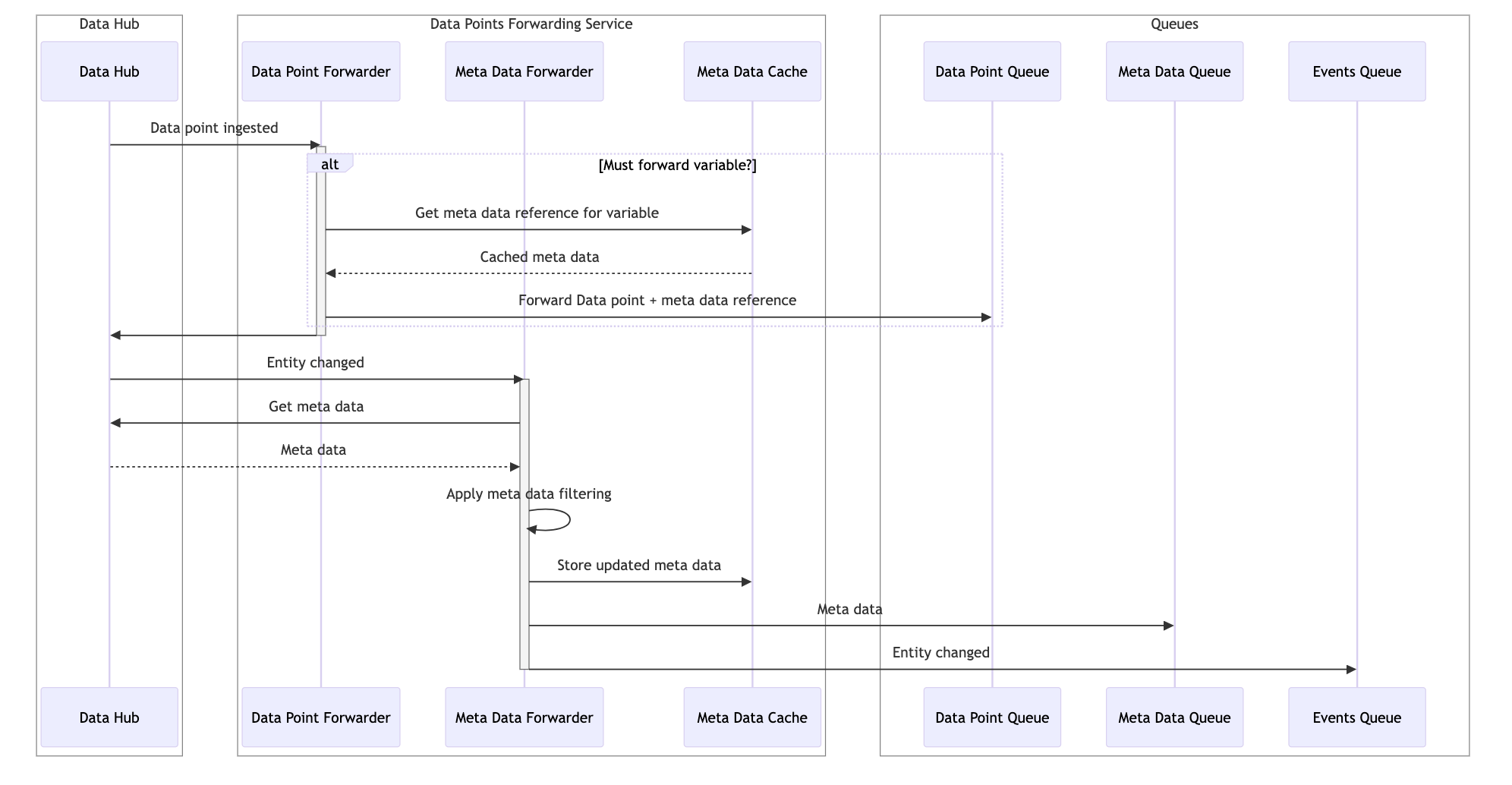
Data Forwarding Configuration
Warning
To access the Data Forwarder configuration, you must first have the service activated by your Verity administrator.
Page Location: Settings → Data Forwarding
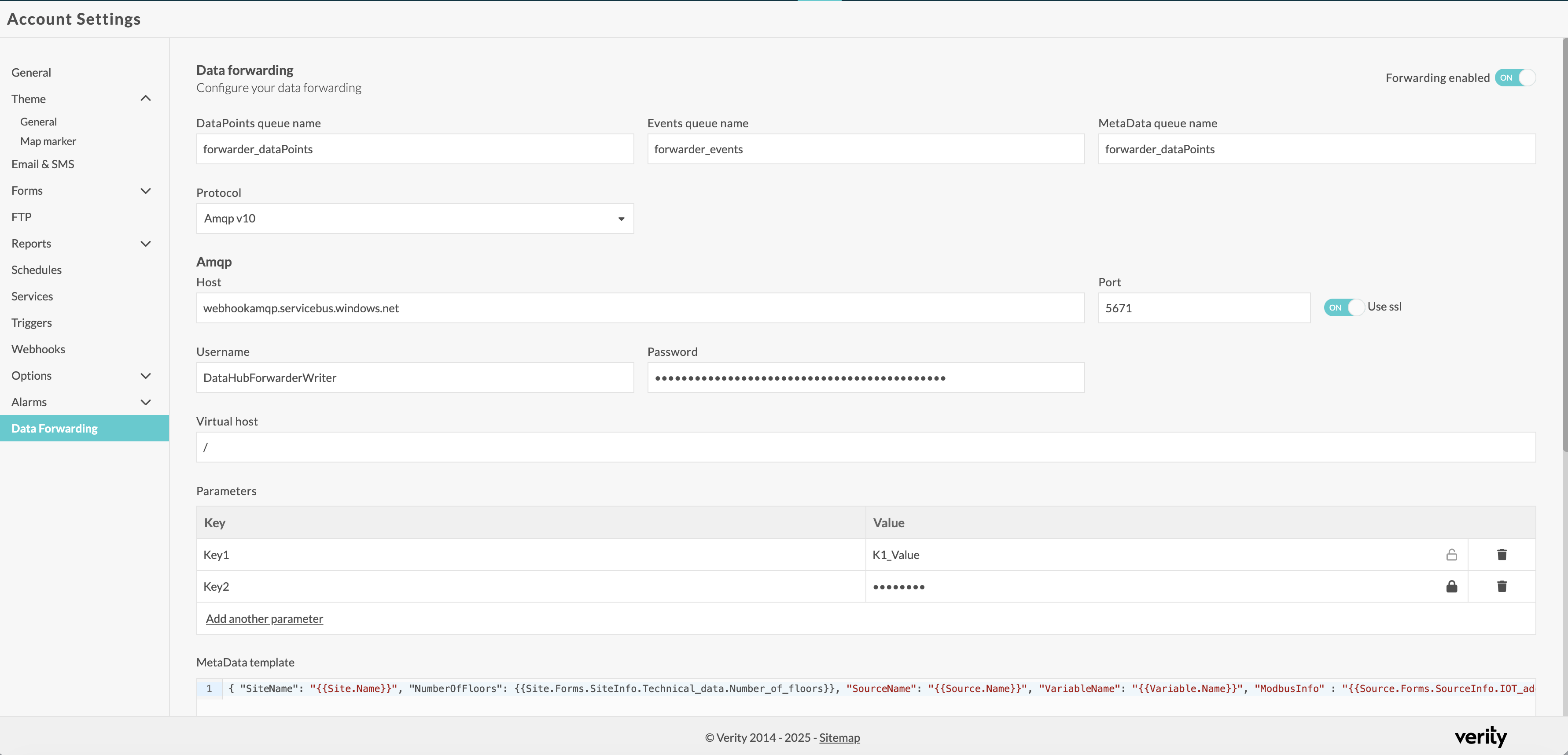
Data Forwarding Activation
- When toggled ON, Insights begins publishing ingested data points to the configured queues.
- When OFF, no new data is forwarded (historical data remains intact).
Queue Configuration
The system generates three types of notifications, each serving a distinct purpose:
- DataPoints: Messages containing a variable ID and a list of (date, value).
- Metadata: Messages containing a variable ID and the rendered metadata associated with that variable, based on the configured template.
- Events: Messages describing changes to DataHub entities (Site, Source, or Variable). Each event includes the entity type, the action performed (Create, Update), the entity ID, and the entity’s properties in JSON format.
These three types of notifications can be routed to queues in the client’s system.
Tip
The user may configure the same queue for multiple notification types.
Warning
If no queue is configured for a given notification type, the system will not send that type of notification.
Protocol Selection
- The user selects which message broker or technology is used.
- Supported options: RabbitMQ (AMQP 0.9), Azure EventHub / ServiceBus (AMQP 1.0), Kafka, MQTT.
RabbitMQ allows you to specify a virtual host. If you do not want to use one, or if you are using other protocols, leave it as “/”.
Additional parameters can be added to the notification. The parameters are stored in the target messages at a place depending on the protocol:
| Protocol | Implementation | Parameters storage |
|---|---|---|
| AMQPV10 | RabbitMq 4.x | Headers |
| AMQPV10 | Service Bus | Custom properties |
| AMQPV10 | Event Hub | Event properties |
| AMQPV09 | RabbitMq 3.x | Headers |
| MQTT | MQTT broker | User properties |
| Kafka | Kafka broker | Headers |
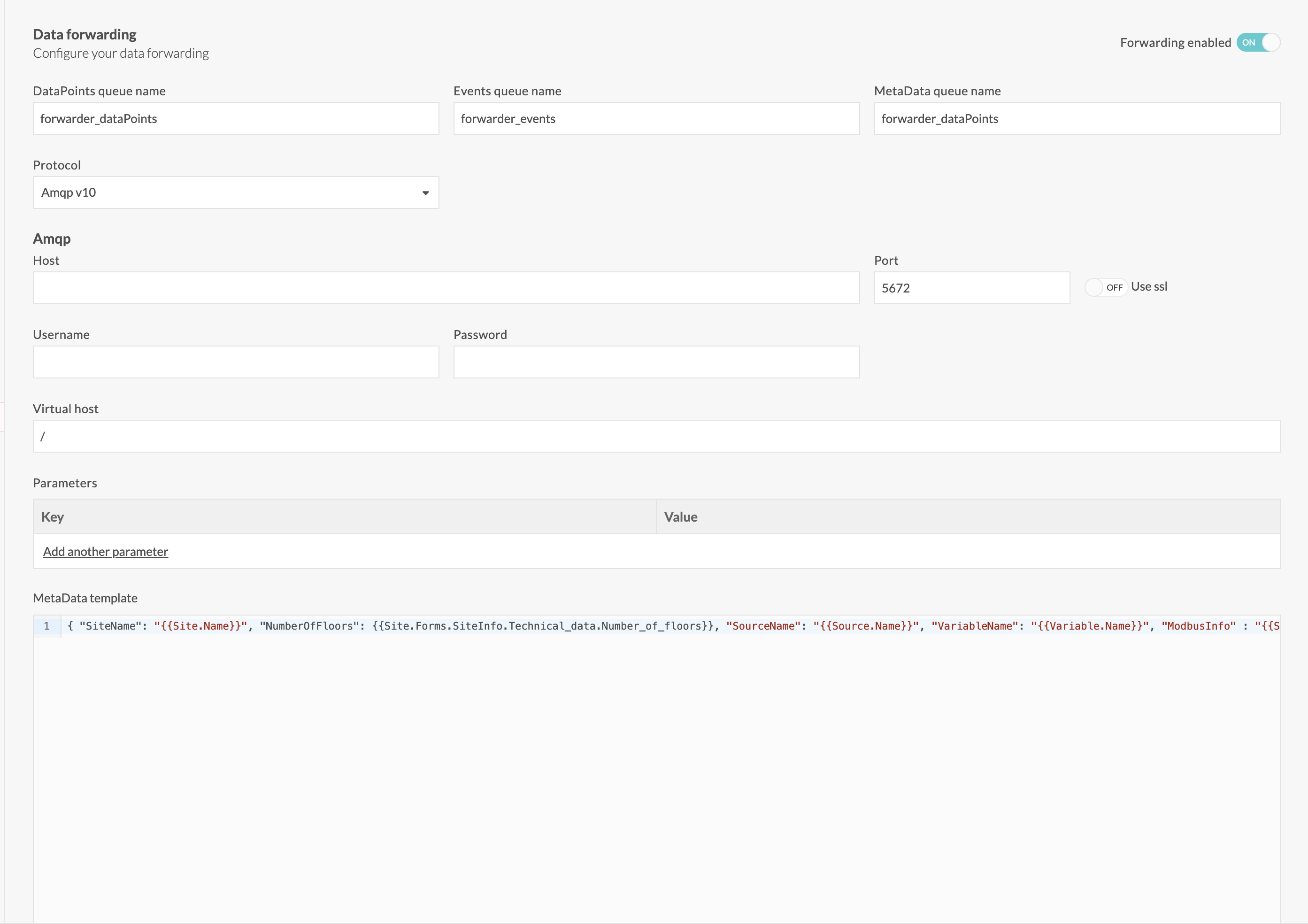
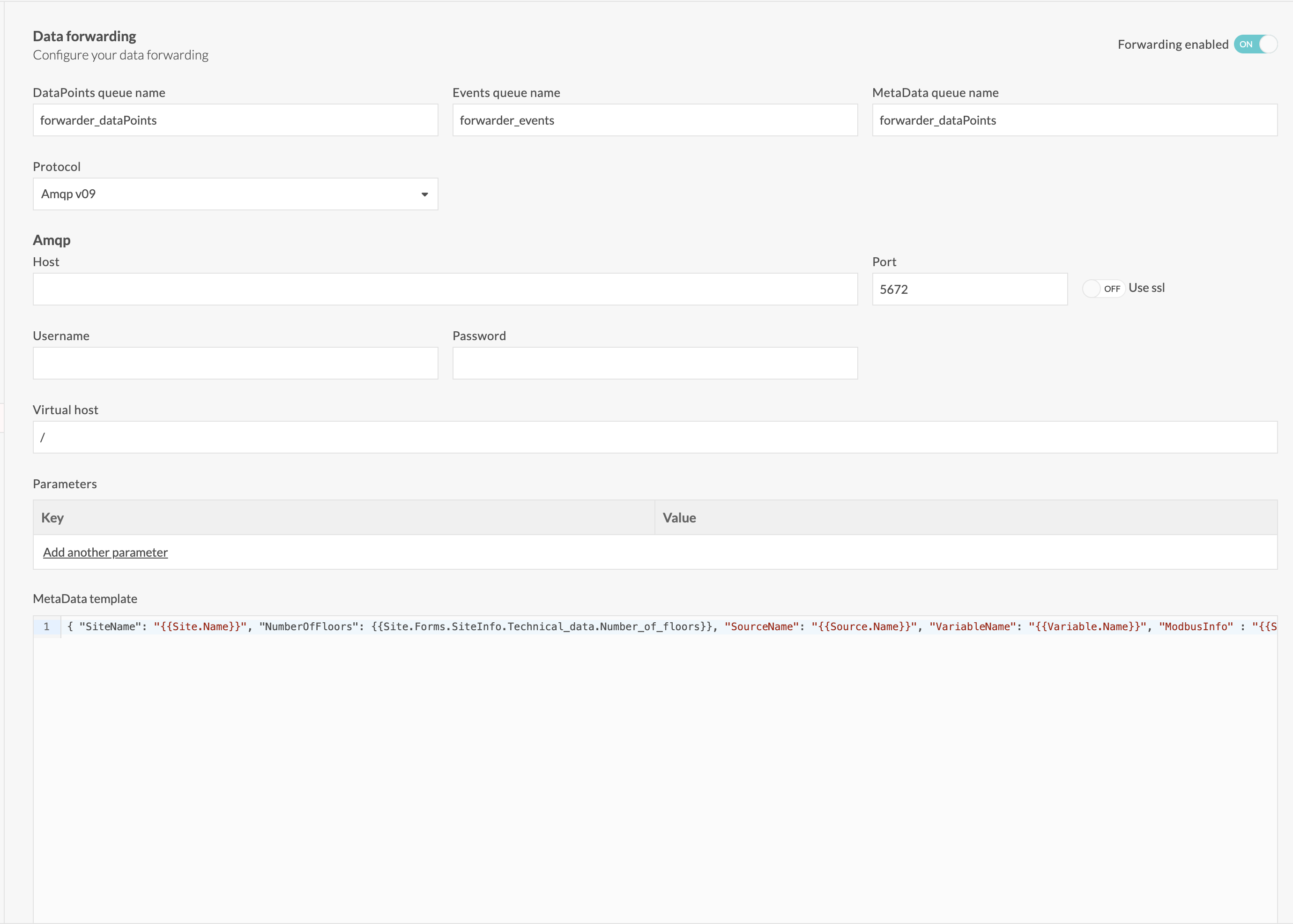
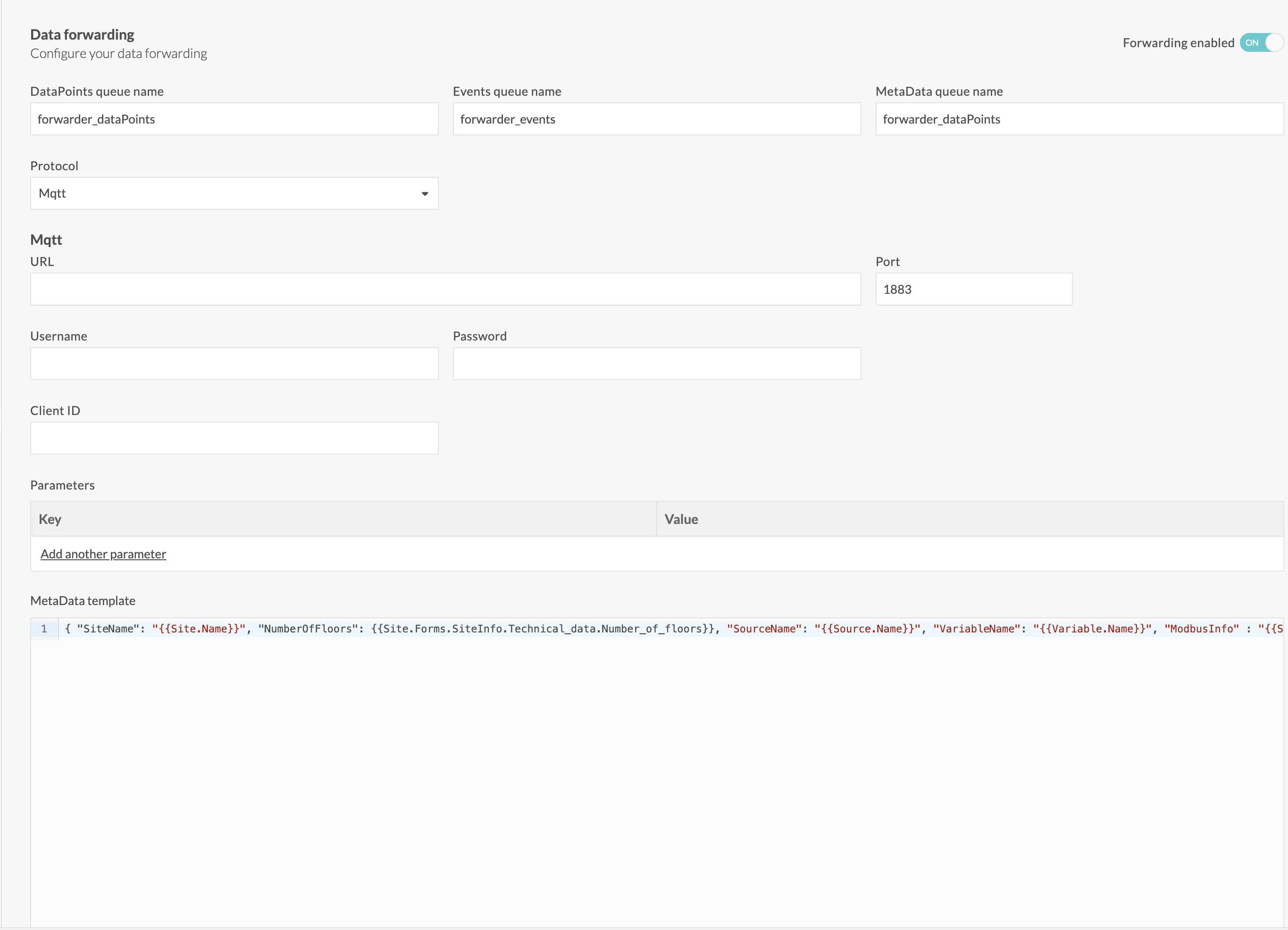
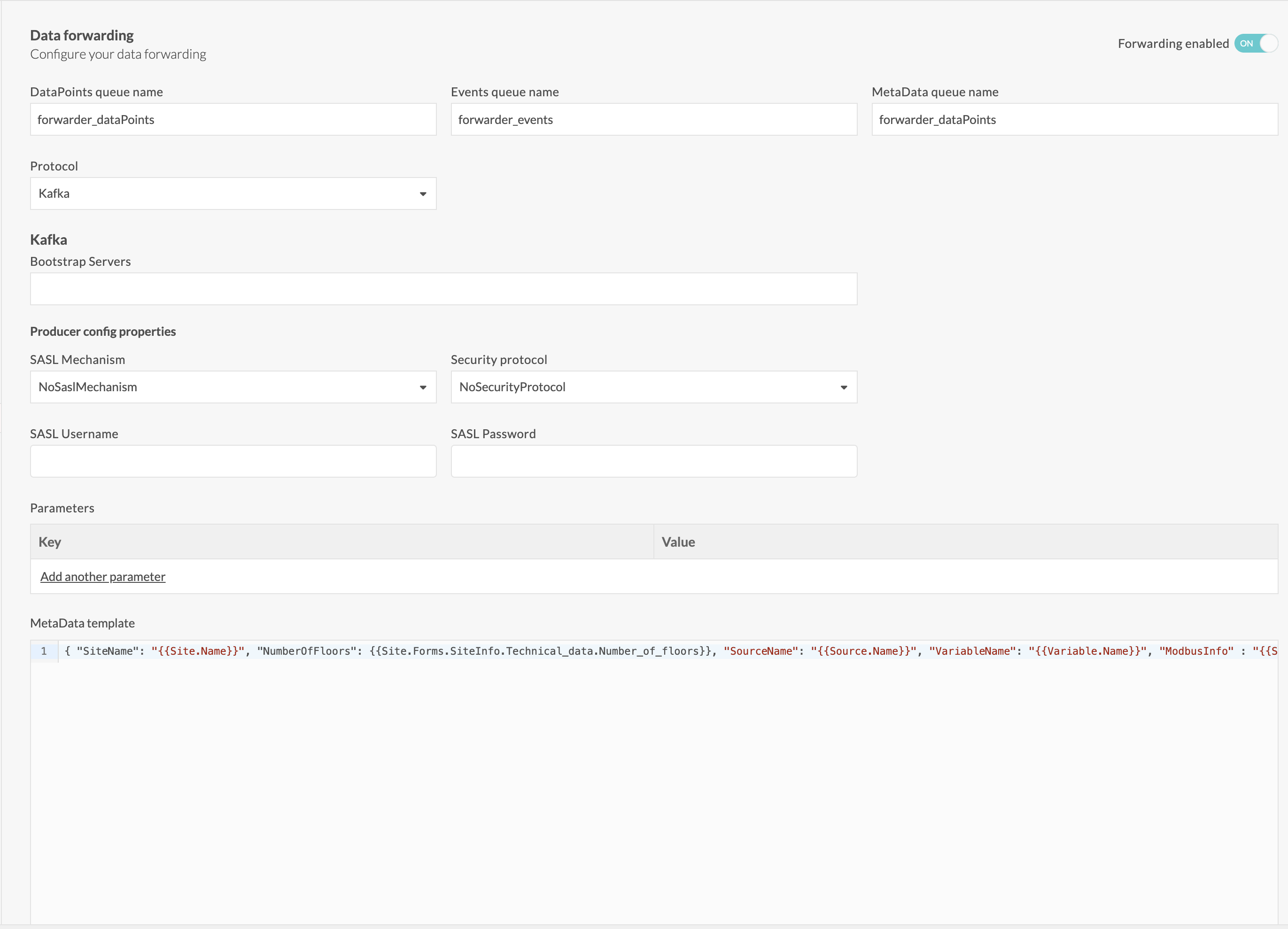
MetaData template editor
Optional editor for defining which metadata attributes are included in the forwarded payloads.
It is a single string that follows Handlebars syntax, rendered with the context related to the data points. See below the supported handlebars expressions relates to Account, Site, Source or Variable Data Hub entities.
Account handlebars expressions
| Property | Replaced by |
|---|---|
| {{ Account.Id }} | The Id of the account |
| {{ Account.Name }} | The name of the account |
| {{ Account.Language }} | The language of the account |
Site handlebars expressions
| Property | Replaced by |
|---|---|
| {{ Site.Id }} | The Id of the site |
| {{ Site.Name }} | The name of the site |
| {{ Site.Location }} | The location of the site |
| {{ Site.Form.Group.Field}} | The value of the site form field |
| {{ Site.Street }} | The street of the site |
| {{ Site.PostalCode }} | The postal code of the site |
| {{ Site.City }} | The city of the site |
| {{ Site.Country }} | The country of the site |
| {{ Site.TimeZoneId }} | The time zone Id of the site |
| {{ Site.Forms.FormName.GroupName.FieldName}} | The value of the site form field |
Source handlebars expressions
| Property | Replaced by |
|---|---|
| {{ Source.Id }} | The Id of the source |
| {{ Source.Name }} | The name of the source |
| {{ Source.MeterAddress }} | The meter address of the source |
| {{ Source.MeterNumber}} | The meter number of the source |
| {{ Source.SerialNumber}} | The serial number of the source |
| {{ Source.Description }} | The description of the source |
| {{ Source.Localisation }} | The localisation of the source |
| {{ Source.EanNumber }} | The EAN number of the source |
| {{ Source.TimeZoneId }} | The timezone Id of the source |
| {{ Source.Tags}} | The list of tags of the source |
| {{ Source.TimeZoneId }} | The timezone Id of the source |
| {{ Source.Forms.FormName.GroupName.FieldName}} | The value of the source form field |
Variable handlebars expressions
| Property | Replaced by |
|---|---|
| {{ Variable.Id }} | The Id of the variable |
| {{ Variable.Name }} | The name of the variable |
| {{ Variable.Class }} | The class of the variable |
| {{ Variable.Tags}} | The list of tags of the variable |
| {{ Variable.Granularity }} | The granularity of the variable |
| {{ Variable.GranularityTimeBase }} | The granularity time base of the variable |
| {{ Variable.UnitId }} | The unit of the variable |
| {{ Variable.UnitSymbol }} | The symbol unit of the variable |
| {{ Variable.MappingConfig }} | The mapping config of the variable |
| {{ Variable.QuantityType }} | The quantity type of the variable |
Form properties in MetaData template
{{ Site.Forms.FormName.GroupName.FieldName}} and {{ Source.Forms.FormName.GroupName.FieldName}} refer to the value of a form field. In DataHub, there is no restriction on characters used in Form, Group or Field names, meaning that they can contain white spaces, curly braces, .... In order allows Handlebars engine to properly render the template, the DataPoints Forward service will replace any the [' ', '{' ,'}', ''', '"', '**', '/', ':', ';', '=', ',', '.**'] characters by a single '_'. By example, a name like "Source info {test.1}" must be referred as "Source_info__test_1_" in the template.
Important
The MetaData template rendering is case sensitive.
Example
Template:
{
	"SiteName": "{{Site.Name}}",
	"NumberOfFloors": {{Site.Forms.SiteInfo.Technical_data.Number_of_floors}},
	"SourceName": "{{Source.Name}}",
	"VariableName": "{{Variable.Name}}",
	"ModbusInfo": "{{Source.Forms.SourceInfo.IOT_address.Host}}@{{Source.Forms.SourceInfo.IOT_address.Modbus_address}}"
}
Note
{{Site.Forms.SiteInfo.Technical_data.Number_of_floors}} is not enclosed by double quotes because the field type is integer.
Rendered MetaData for a given variable:
{
    "SiteName": "TestSite",
    "NumberOfFloors": 2,
    "SourceName": "TestSource",
    "VariableName": "General consumption",
    "ModbusInfo" : "modbus://myhost2.eu@1.2.3" }
Queue messages
Every queue message contains a message Id that is a Bson ObjectId (unique and contains the timestamp of the Id generation), a body whose type is defines by the ContentType message property and additional parameters.
DataPoints message
Contains the data points related to a given variable Id.
Purpose
Copy ingested data points to the target queue.
Body content
{
    "dp": [
        {
            "d": "DateTimeOffset",
            "v": "double"
        },
        ...
    ]
}
Message properties
{
    "MessageType" : "DataPoints"
    "Version" : "string",
    "AccountId" : "int",
    "VariableId": "int",
    "MetaDataHashKey" : "string",
    "ContentType" : "application/json"
}
Tip
MetaDataHashkey is the same as the last one in the MetaData table corresponding to variable
MetaData message
Adds additional informations to a variable Id.
Purpose
The purpose of meta data is to enrich the context of forwarded data points. The customer defines the meta data based on its needs using a Handlebars expression similar to the one used in DataHub report definition. This could potentially lead to a lot of information's to transport along with the data points. In order to keep meta data volume under control, the DataPoints Forwarding service will compute a unique meta data identifier that it will transmit along with forwarded data points. This identifier could be considered as the primary key of meta data documents stored in the MetaData queue. The use of such identifier also eases meta data change tracking: the full meta data history will flow through the meta MetaData queue. It is up to the customer to decide how to deal with the history:
- either override the meta data row, just keeping the latest version and link data points to this single meta data version
- store every meta data row and linking a data point to the meta data existing at the time it was processed. Should meta data change, the unique identifier will also change and the data points forwarded after the change will carry the new meta data identifier.
Body content
The body contains the result of the rendered MetaData template defined in the configuration.
Message properties
{
    "MessageType" : "MetaData"
    "Version" : "string",
    "AccountId" : "int",
    "VariableId": "int",
    "MetaDataHashKey" : "string",
    "ContentType" : "application/json" or "application/text"
}
Events messages
Contains events related to changes made on DataHub entities.
Purpose
Forward events that happened on DataHub entities.
Body content
The body contains the result of the rendered MetaData template defined in the configuration.
Message properties
{
    "MessageType" : "Event"
    "Version" : "string",
    "AccountId" : "int",
    "VariableId": "int",
    "MetaDataHashKey" : "string",
    "ChangeType" : "Create" or "Update"
    "ChangeDate" : "DateTimeOffset",
    "EntityType" : "Site" or "Source" or "Variable",
    "EntityId" : "string",
    "ContentType" : "application/json"
}
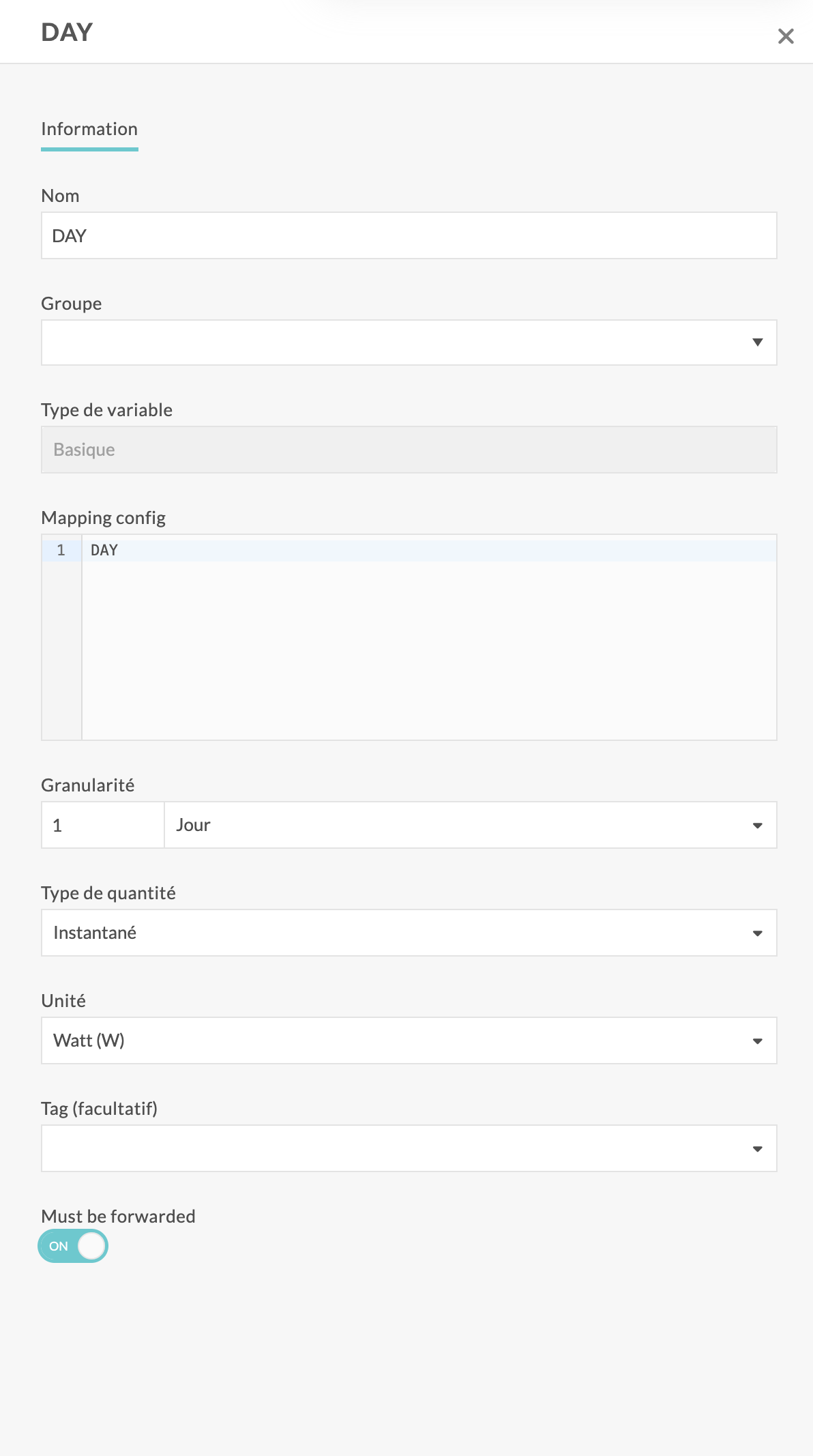
How do I enable the forwarding of a variable?
A toggle is available in the variable configuration screen. To enable data forwarding for the variable, switch it on.
Error Handling
If the target data lake or broker is temporarily unavailable, the system buffers data until connectivity is restored, ensuring no data loss.
Example
Let’s consider a metadata template configuration as follows:
{ "SiteName": "{{Site.Name}}", "NumberOfFloors": {{Site.Forms.SiteInfo.Technical_data.Number_of_floors}}, "SourceName": "{{Source.Name}}", "VariableName": "{{Variable.Name}}", "ModbusInfo" : "{{Source.Forms.SourceInfo.IOT_address.Host}}@{{Source.Forms.SourceInfo.IOT_address.Modbus_address}}" }
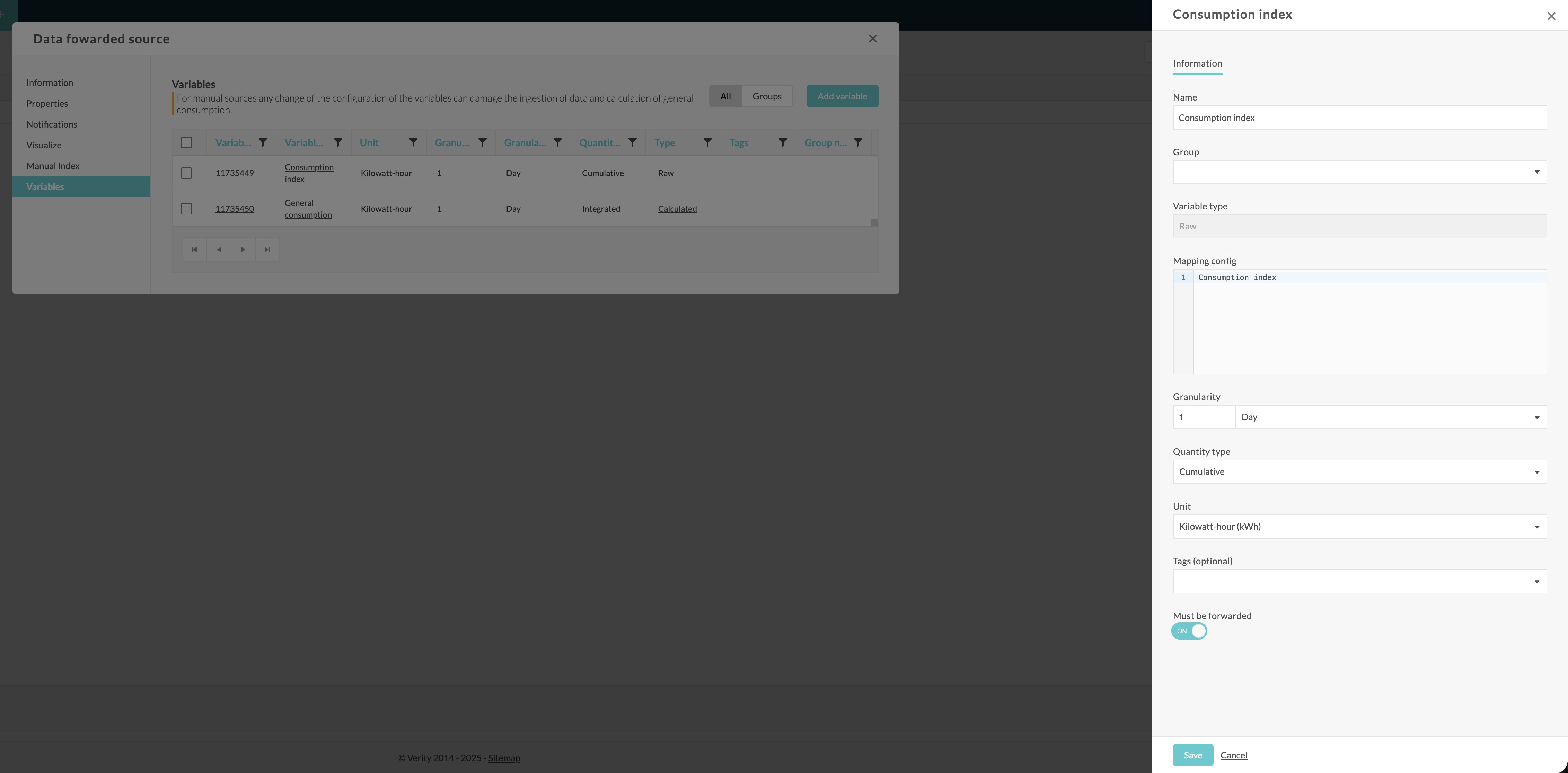
Let’s create a source whose SourceType is “Manual Index”.
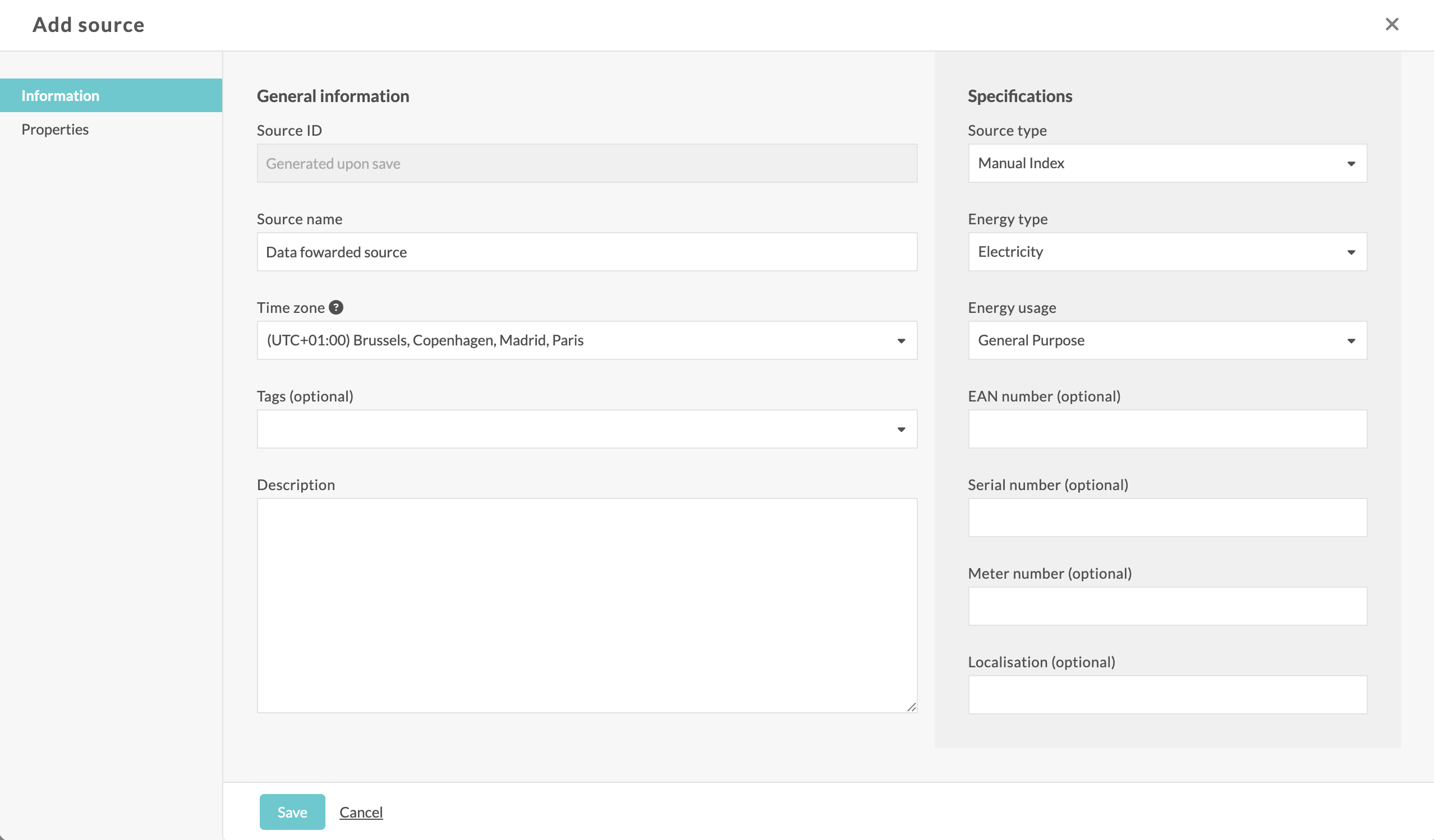
The associated variable has "Must be fowarded" enabled.
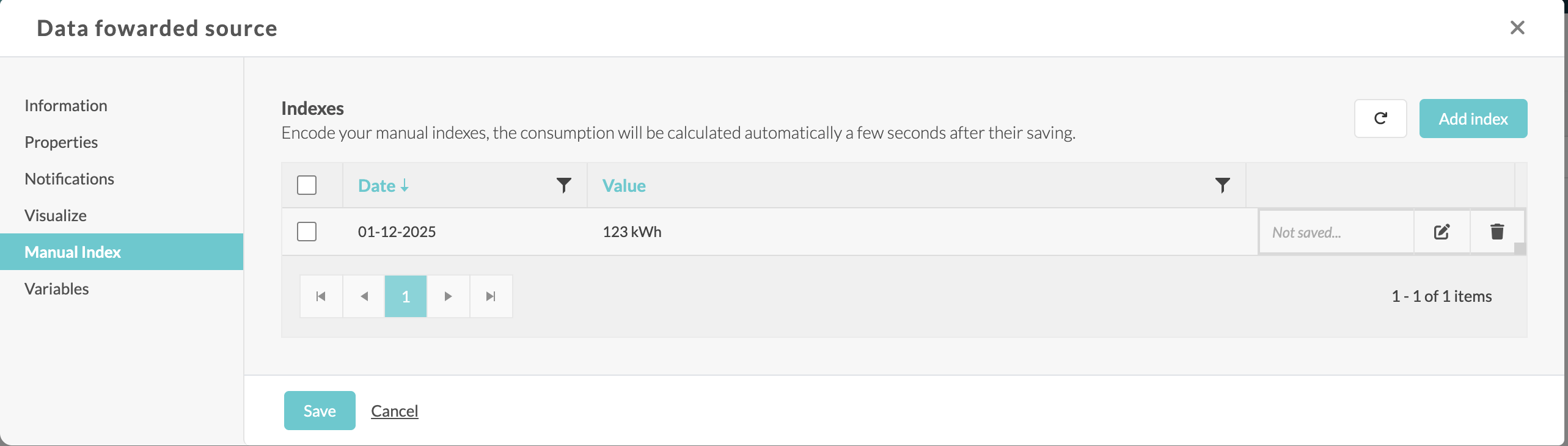
Let’s manually enter an index.
Event Queue
In the client’s queuing system, we will receive on the Events queue a notification indicating that a source has been created:
Message Properties
| Key | Value |
|---|---|
| deliveryCount | 0 |
| contentType | application/json |
| messageId | 693bcda40d37b0d8e7b07f8e |
| sequenceNumber | 184 |
| enqueuedTimeUtc | "2025-12-12T08:09:08.686Z" (ven. 12 déc. 2025, 09:09:08 AM UTC+1) |
| expiresAtUtc | "+031197-09-14T02:48:05.477Z" (dim. 14 sept. 31197, 04:48:05 AM UTC+2) |
Custom Properties
| Key | Value |
|---|---|
| MessageType | Event |
| Version | 1.0 |
| AccountId | 507 |
| VariableId | 858294 |
| EntityType | Source |
| ChangeType | Create |
| ChangeDate | 2025-12-12T08:09:08.4961440+00:00 |
| ContentType | application/json |
| Key1 | K1_Value |
| Key2 | ******** |
Message Body
{
   "Id": 858294,
   "Name": "Data fowarded source",
   "EnergyTypeId": 1,
   "EnergyUsageId": 7,
   "SourceTypeId": 4,
   "TimeZoneId": "Romance Standard Time",
   "EanNumber": null,
   "MeterNumber": null,
   "Localisation": null,
   "Description": null,
   "SerialNumber": "a897d45c-6235-4c33-abf4-f1ee5ec28379",
   "SimId": null,
   "DisplayVariableTypeId": null,
   "GatewayId": 545606,
   "GatewayTypeId": 5,
   "MeterAddress": null,
   "SiteId": 19106
}
In the same way, you will receive a notification for the creation of the variable.
Metadata queue
In the client’s queuing system, we will receive on the Metadada queue a notification providing information regarding the site/source/variable (depending of the metadata template) that have received datapoints
Message Properties
| Key | Value |
|---|---|
| deliveryCount | 0 |
| contentType | application/json |
| messageId | 693bd3d60d37b0d8e7b07f90 |
| sequenceNumber | 22877 |
| enqueuedTimeUtc | "2025-12-12T08:35:34.865Z" (ven. 12 déc. 2025, 09:35:34 AM UTC+1) |
| expiresAtUtc | "+031197-09-14T02:48:05.477Z" (dim. 14 sept. 31197, 04:48:05 AM UTC+2) |
Custom Properties
| Key | Value |
|---|---|
| MessageType | MetaData |
| Version | 1.0 |
| AccountId | 507 |
| VariableId | 11735449 |
| MetaDataHashKey | fd895b229a7e65f72c246e70511562ae |
| ContentType | application/json |
| Key1 | K1_Value |
| Key2 | ******** |
Message Body
{
   "SiteName": "MySite 11",
   "NumberOfFloors": 2,
   "SourceName": "Data fowarded source",
   "VariableName": "Consumption index",
   "ModbusInfo": "@"
}
Datapoints queue
In the client’s queuing system, we will receive on the DataPoints queue a notification providing information of the fowarded datapoints
Message Properties
| Key | Value |
|---|---|
| deliveryCount | 0 |
| contentType | application/json |
| messageId | 693bd3d60d37b0d8e7b07f91 |
| sequenceNumber | 2282287877 |
| enqueuedTimeUtc | "2025-12-12T08:35:34.943Z" (ven. 12 déc. 2025, 09:35:34 AM UTC+1) |
| expiresAtUtc | "+031197-09-14T02:48:05.477Z" (dim. 14 sept. 31197, 04:48:05 AM UTC+2) |
Custom Properties
| Key | Value |
|---|---|
| MessageType | DataPoints |
| Version | 1.0 |
| AccountId | 507 |
| VariableId | 11735449 |
| MetaDataHashKey | fd895b229a7e65f72c246e70511562ae |
| ContentType | application/json |
| Key1 | K1_Value |
| Key2 | ******** |
Message Body
{
   "dp": [
      {
         "d": "2025-12-01T00:00:00.0000000+01:00",
         "v": 123
      }
   ]
}